


 Sonar Tracker
Set up your school
Create grade methods
A grade method lists the grades Sisra Analytics accepts for a kind of qualification, with the points and entries each grade is worth. Sisra provides none, so you create one for each grading system your school uses, at KS3/4 and at KS5. A qualification takes its grade method from the Expected Attainment Pathway (EAP) chosen for it on the Matching page.
Before you start
Section titled “Before you start”You need:
- an authority group with Access Data Section, such as Admin
- a list of the qualifications each cohort takes, with their QNs (qualification numbers), from your exams officer
- for KS4 qualifications, the DfE’s points and entries for each grade
The DfE publishes KS4 points in Key stage 4 qualifications, discount codes and point scores on GOV.UK, last updated 16 July 2026. At KS5, Sisra fills in the DfE’s points for you.
At KS3/4 you need at least one method with Attainment 8 points before you can create an EAP. Authority groups and permissions explains Access Data Section.
Create a KS3/4 grade method
Section titled “Create a KS3/4 grade method”- Select CONFIG, then Grade Methods, then KS3/4 Methods.
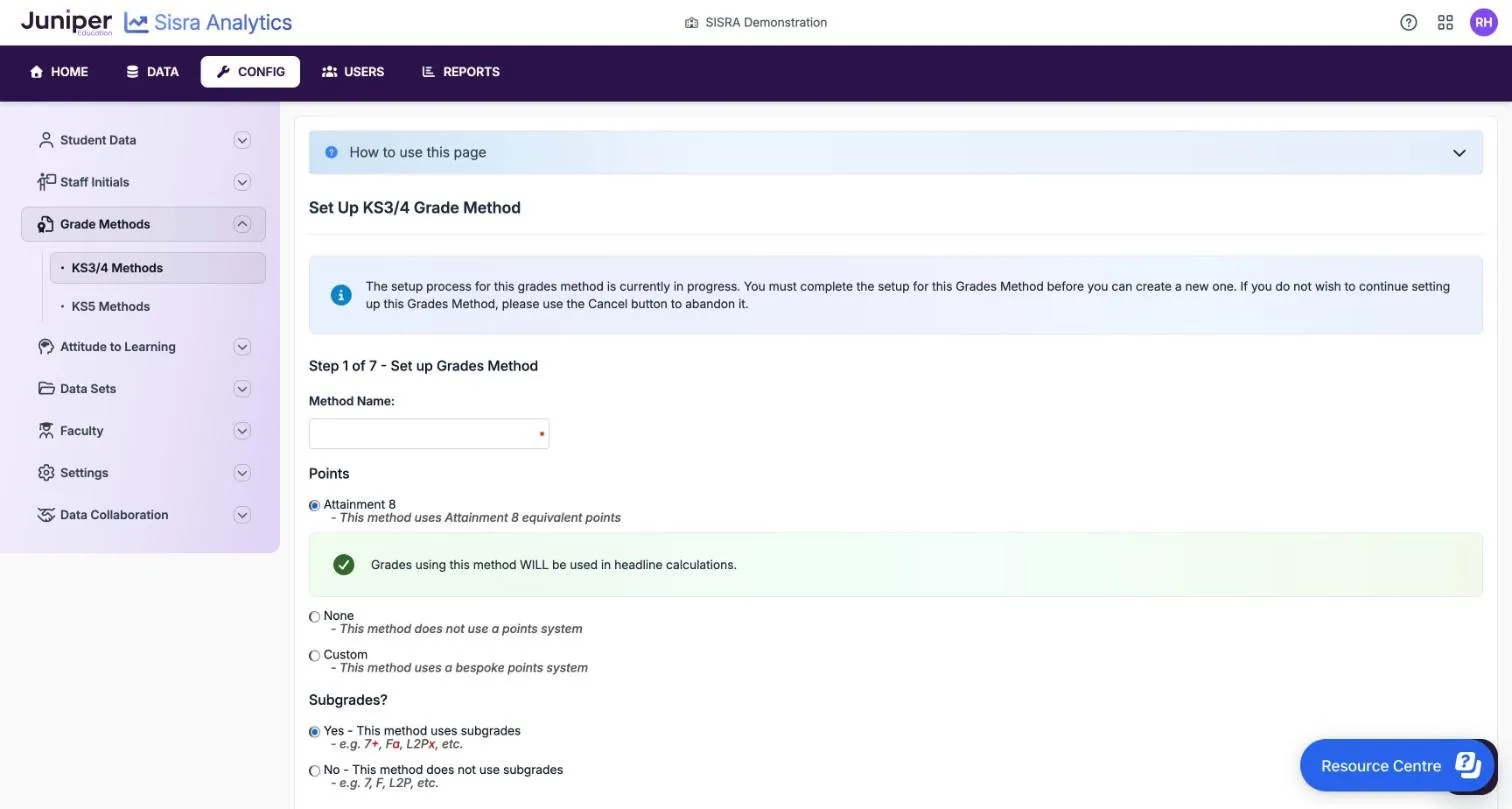
- Select Create KS3/4 Grade Method. Step 1 of 7 - Set up Grades Method opens.
- Enter the Method Name:.
- Under Points, choose Attainment 8, None or Custom.
- Under Subgrades?, choose Yes - This method uses subgrades or No - This method does not use subgrades.
- For a method with Attainment 8 points, choose This method does not have split grades or This method does have split grades.
- Select Next, then complete the steps in Complete the KS3/4 set-up.
| Points | Use it for | Counts in headline measures |
|---|---|---|
| Attainment 8 | Qualifications that count in the DfE’s KS4 measures, such as GCSEs. Points from 0 to 11 | Yes. The page says “Grades using this method WILL be used in headline calculations.” |
| None | Grades with no points, such as KS3 descriptors | No |
| Custom | A scale of your own, such as KS3 percentages. Points from 0 to 500 | No |
The method list shows these as Att 8 Points, No Points and Bespoke Points. Some reports list qualifications in order of their grade method’s name, so a name such as 9-1 GCSE Single sorts first.
Selecting Next on step 1 saves the method as in progress. Until you finish it or select Cancel, you cannot start another KS3/4 method. The list greys out Create KS3/4 Grade Method and shows Resume KS3/4 Grade Method Set Up instead. The set-up page says the set-up is in progress from the start, and asks you to confirm if you leave it.
Complete the KS3/4 set-up
Section titled “Complete the KS3/4 set-up”A method with subgrades has seven steps, or six if it has no points, because Define Sub Grade Points is left out. Without subgrades there are three: step 1, the whole grades and the confirmation.
| Step | What you enter |
|---|---|
| Define Whole Grades | Each grade with its points and entries, strongest first. From 2 to 12 whole grades, including fail grades, each up to 8 characters. Points and entries can have up to 3 decimal places |
| Define Sub Grades | From 2 to 10 subgrades, such as +, = and -, strongest on the left. Each is up to 4 characters |
| Define Master Grades | Tick the subgrades each whole grade can take. A whole grade with a subgrade, such as 7+, is a master grade |
| Define Sub Grade Equivalencies | The master grade that a whole grade on its own equals. With 8=, an uploaded 8 counts as 8=: below 8+ and above 8− |
| Define Sub Grade Points | Optional. Points for each master grade, instead of its whole grade’s points |
| Confirmation | Check the method, then select Finish, or Previous to go back |
Enter a master grade such as 8+ as its whole grade, 8, on the whole grades step. If you use only two subgrades, such as + and -, add = as a third. Otherwise the equivalencies step will not complete.
Subgrade points change every points-based measure, including the headline figures. A 5− worth 4.7 points would no longer count as grade 5 or above. Use them only in methods for internal analysis, such as KS3 percentages.
Finish opens the method’s Grades Method Detail page.
Fail grades
Section titled “Fail grades”| Grade | Points | Entries | Effect |
|---|---|---|---|
| U, and F in qualifications other than GCSEs | 0 | 1 | Counts as an entry in the headline measures |
| X | 0 | 0 | Left out of the headline measures, but shown in pupil-level reports such as Grades |
Split grades for double awards
Section titled “Split grades for double awards”A double award such as combined science, graded 66, 65 or 55, needs its own method. Give it Attainment 8 points and This method does have split grades. On the whole grades step, enter single grades of up to 4 characters, such as 9, 8 and 7, with their points. Sisra then makes the split grades, each worth the total of its two grades. In the demo school’s 9-1 Whole Grades (Double), 99 is worth 18 points, 98 is worth 17 and 88 is worth 16.
Check a KS3/4 method
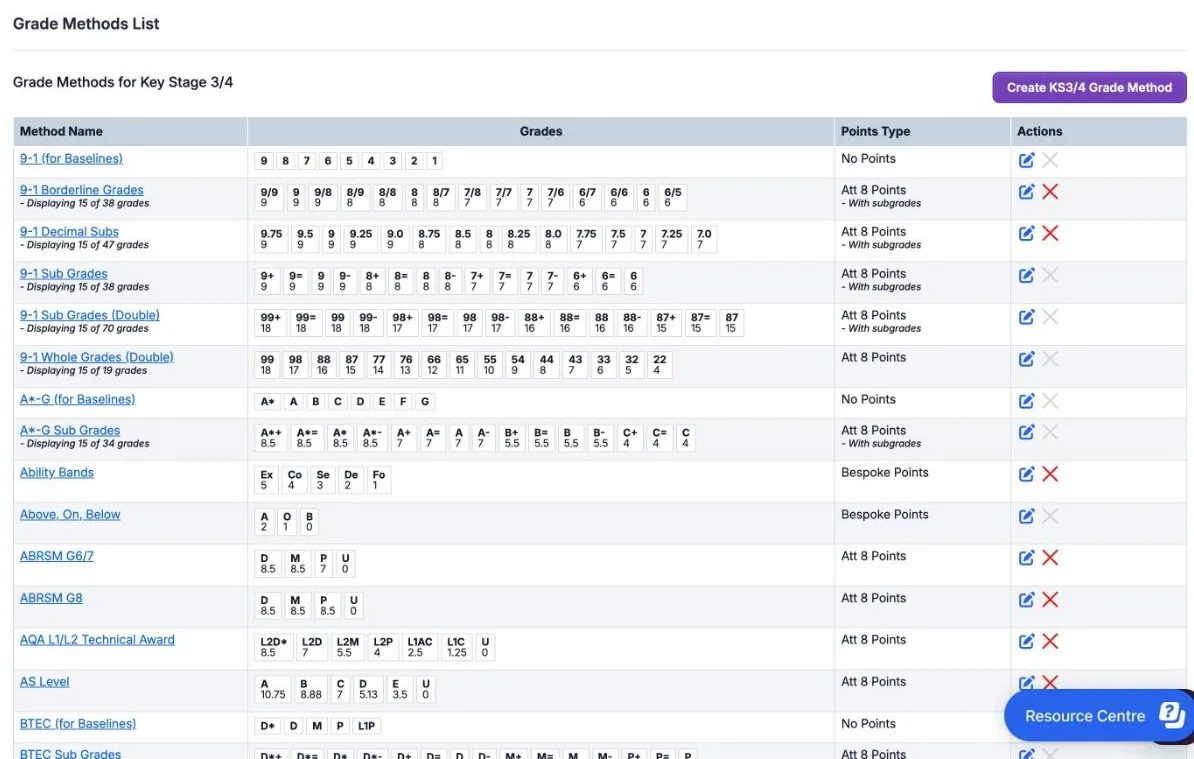
Section titled “Check a KS3/4 method”The Grade Methods for Key Stage 3/4 list shows each method with up to 15 of its grades, their points, and its Points Type.
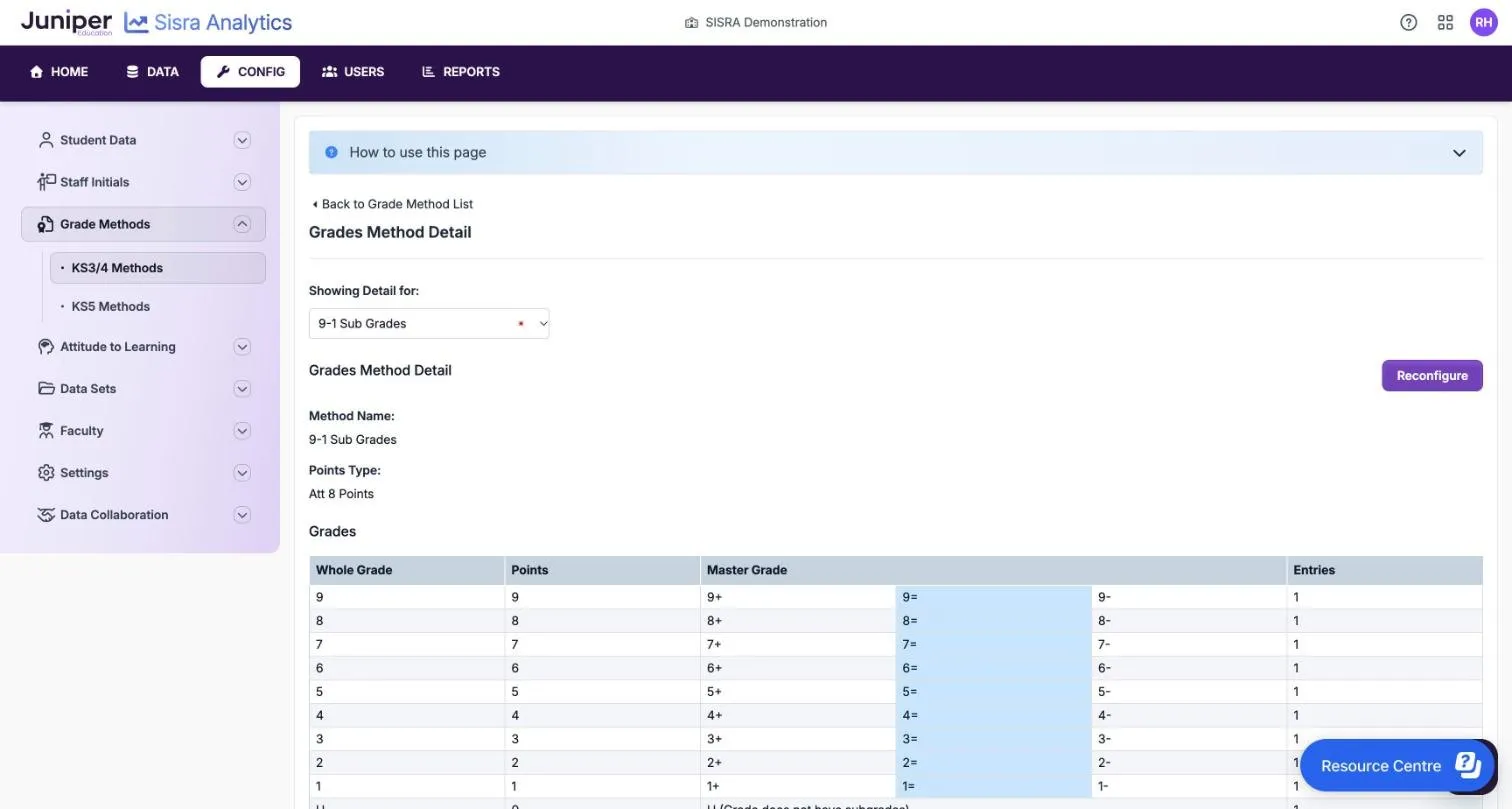
Select a method’s name to open Grades Method Detail. It shows the Method Name:, the Points Type: and a Grades table with Whole Grade, Points, Master Grade and Entries. Blue shading marks the master grade that a whole grade on its own equals. View Subgrade Points shows any subgrade points.
Set up percentages and judgements at KS3
Section titled “Set up percentages and judgements at KS3”KS3 grades do not have to look like GCSE grades. Use these methods for KS3 cohorts only.
Judgements or descriptors, such as Emerging, Developing and Secure, need a method with None or Custom points. Whole grades can be up to 8 characters, so shorten longer words: Developing could become Develop or Dvlping.
Percentages need a method that stores the tens as whole grades and the units as subgrades:
- On step 1, name the method, such as
Percentage Grades. Choose Custom points and Yes - This method uses subgrades. - On the whole grades step, enter
100, then9down to0for the tens. Give them 100, 90, 80 and so on down to 0 points. You can addAbsfor absent, which makes 12 whole grades, the most allowed. - On the subgrades step, enter
9down to0for the units. - On the master grades step, untick subgrades you will never upload, such as those for
Abs. In the 100 row, leave 1000 ticked, or the set-up will not continue. - On the equivalencies step, match each whole grade to its master grade: 100 to 1000, 9 to 90, 8 to 80, and so on.
- On the subgrade points step, tick This method uses custom points for subgrades and give each master grade its own points.
- Select Finish.
A pupil uploaded with 88 has whole grade 8 and subgrade 8. With subgrade points, 88 is worth 88 points. Without them it is worth 80, the same as every grade from 80 to 89. Upload percentages under 10 with a leading zero, such as 07.
In the reports, the Grades Overview column 9 counts 90% to 99%, and Average Points is an average percentage: 46.82 means 46.82%.
Set up a qualification with no Attainment 8 points
Section titled “Set up a qualification with no Attainment 8 points”An EAP’s KS4 Exams term accepts only a method with Attainment 8 points. Sisra will not publish baselines and EAPs while an EAP has no such points for that term. So a KS4 qualification with exams but no Attainment 8 points, such as entry level, needs a method that has points but scores nothing.
- Create a KS3/4 method with Attainment 8 points and no subgrades.
- Give one grade 0.001 points and every other grade 0. Reports show points to 2 decimal places, so that grade still shows as 0.
- Create an EAP that uses the method in its KS4 Exams term. See Set up EAPs for KS3/4.
- On the Matching page, choose that EAP for the qualification and set its KS4 Measure to Unapproved. If Use QN is on, search QN Title for the unapproved option, such as Unapproved English.
The qualification then appears in the Grades reports but not in the headline figures. Residuals still include it, so report users can leave it out on the Residual Excl. tab. Match qualifications in KS3/4 explains unapproved qualifications.
Create a KS5 grade method
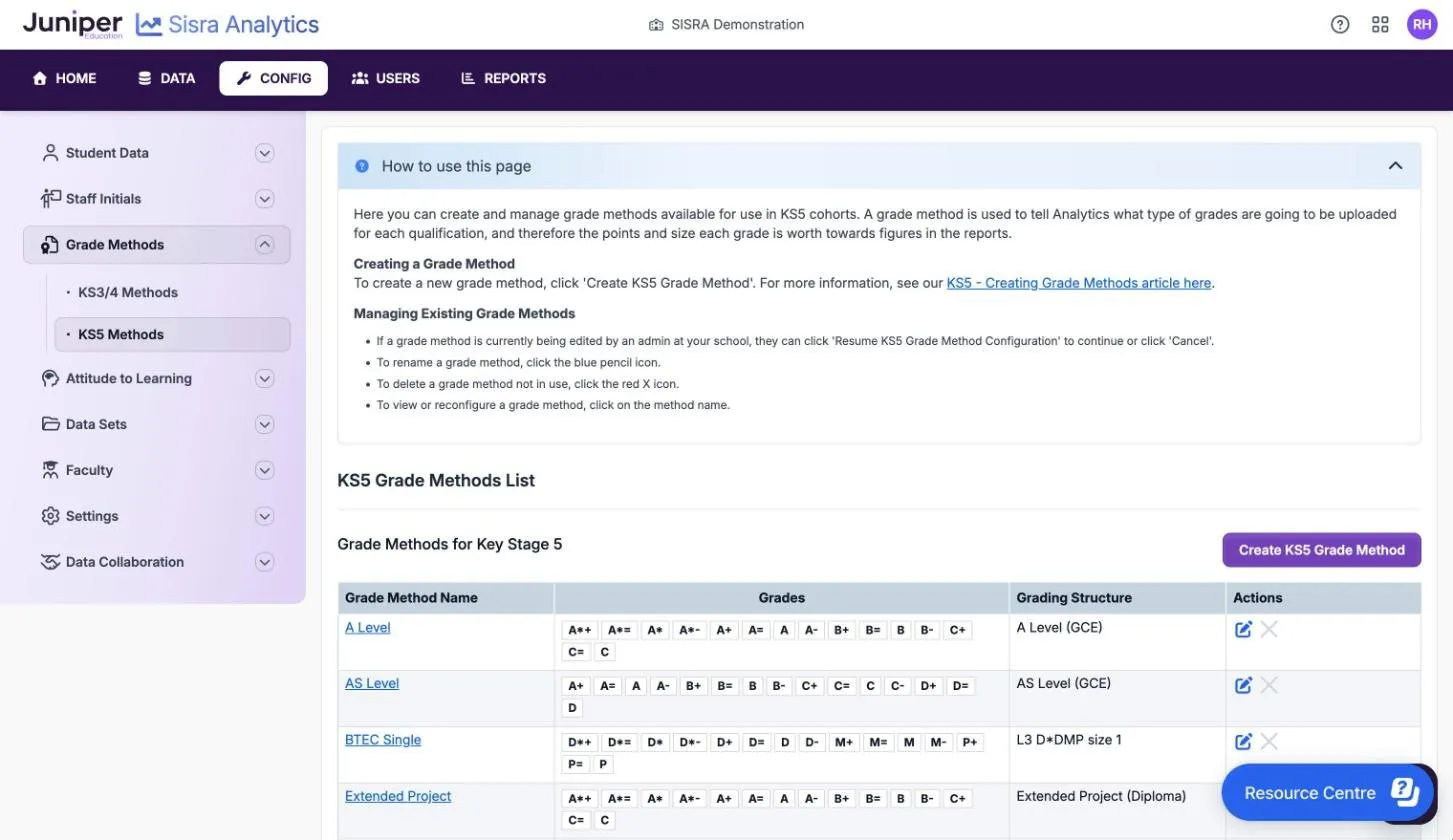
Section titled “Create a KS5 grade method”KS5 methods start from a grading structure the DfE reports on, so Sisra fills in the official grades, points and entries. You need one method for each structure your students take: one A Level (GCE) method serves every A level. Create methods for level 2, level 1 and entry level qualifications too, such as GCSE resits.
- Select CONFIG, then Grade Methods, then KS5 Methods.
- Select Create KS5 Grade Method.
- Search for the grading structure by QN, qualification type, qualification name or provider, then select it. The help centre recommends searching by QN.
- Check the Method Name, which Sisra fills in from the structure. Keep it general, such as
A Level, rather than naming a subject. - Check the official whole grades, with their points and entries. To add grades the DfE does not award, such as
WT, tick Create additional non-scoring grades. - Complete the optional steps you need, described in the next table.
- Select Finish. The method’s detail page opens.
| Optional step | Use it to |
|---|---|
| Fail grades | Rank your added grades among the fail grades, such as WT above U. It appears only if you added grades |
| Alternative upload values | Accept another spelling of a grade in your files, such as Pass for P. One value of up to 8 characters for each grade |
| Sub grades | Add 2 to 10 subgrades of up to 4 characters, strongest first. With only two, add a third, or the equivalencies step will not complete |
| Master grades and grade equivalencies | As at KS3/4: the subgrades each grade can take, and the master grade a whole grade on its own equals |
The help centre says you can add up to 5 grades of your own, each up to 7 characters. They are worth 0 performance and challenge points, and you choose whether each has the official entries or none.
If another method already uses the structure, a Grading Structure Already In Use message asks you to confirm. Create a second method only if it needs different subgrades or added grades. Sisra cannot set up a few structures, such as the IBacc Diploma and qualifications the DfE has not reported on since 2017.
Double, triple and quad awards
Section titled “Double, triple and quad awards”Files for these awards must hold the official grades, such as D*D*, DD, MM or PP. A single D* is not recognised. To accept single grades, use alternative upload values: enter D* beside D*D*, D beside DD, and so on. Leave mixed grades such as D*D blank. An uploaded D* then counts as D*D*.
Check a KS5 method
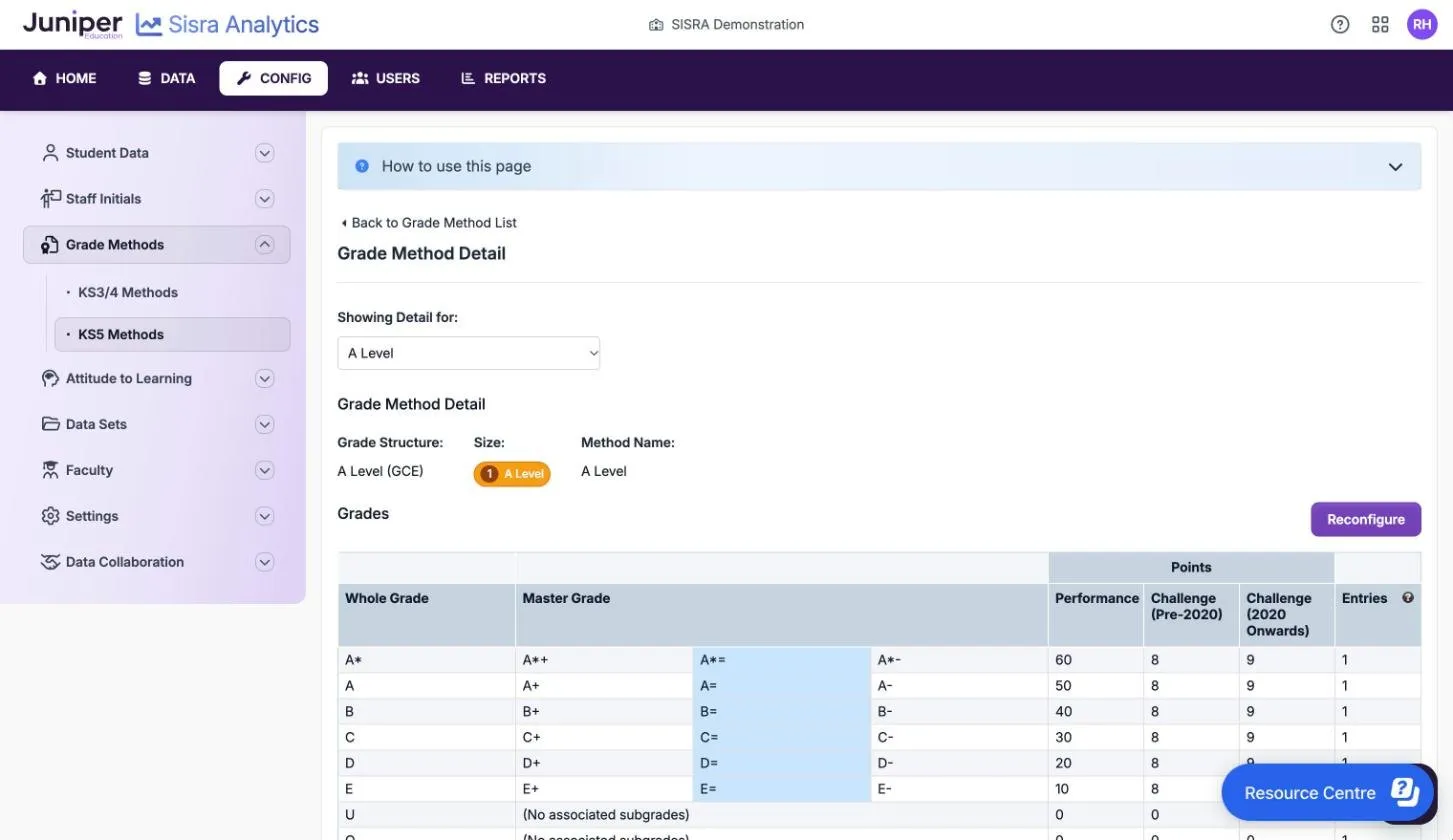
Section titled “Check a KS5 method”Select a method’s name to open Grade Method Detail. It shows the Grade Structure:, the Size:, the Method Name: and a Grades table. Size: compares the qualification with an A level, such as 1 A Level. The Points columns are Performance, Challenge (Pre-2020) and Challenge (2020 Onwards).
Performance points feed the attainment measures, such as average points per entry. Challenge points feed the English and maths progress measures and the level 3 maths measure. In the demo school’s A Level method, A* to E are worth 60, 50, 40, 30, 20 and 10 performance points, with 1 entry each. These match the DfE’s 16 to 19 points for an A level, as published in August 2026.
Rename or delete a grade method
Section titled “Rename or delete a grade method”- To rename a method, select the pencil in Actions.
- To delete a method that no EAP uses, select the red cross in Actions. Sisra asks: “Deleting this method will also delete the associated grades. Are you sure you wish to continue?”
A grey cross means the method is in use. Its tooltip reads “This Grade Method is in use and cannot be deleted”.
Change a grade method with Reconfigure
Section titled “Change a grade method with Reconfigure”Select a method’s name, then Reconfigure. The set-up steps open with the method’s current settings. At KS5, use it to change your added grades, alternative upload values or subgrades.
After you change a method that qualifications use, publish KS2 / EAP (KS4 / EAP at KS5), then each data set that includes them. See When to republish. To give a qualification a different method, change its EAP instead.
If something goes wrong
Section titled “If something goes wrong”You cannot start a new KS3/4 method. You have another method still in set-up. Select Resume KS3/4 Grade Method Set Up, then finish or cancel it.
“The grades method you are trying to edit is being edited by another user.” Someone else has the method open in set-up. Wait for them to finish.
“You need to have at least one active EAP Grades Method, using Att 8 points, in the Config area to access this section.” Create a KS3/4 method with Attainment 8 points.
Publishing stops because grade methods “have incorrect points values”. Check the points and entries in the grade methods that your EAPs use against the DfE’s list for the year.
Grades Management shows Grade Not In Method. A file holds a grade the method does not have. Correct the file, or add the grade with Reconfigure. See Warning icons.
A KS5 qualification’s row is red on the Matching page. Its EAP uses a method with the wrong grading structure. See Match qualifications in KS5.