


 Sonar Tracker
Baselines and EAPs
Set up KS5 baselines and EAPs
A KS5 cohort needs two kinds of baseline. Core baselines are each student’s KS4 results, which Sisra Analytics uses for level 3 value added and the English and maths progress measures. Baselines for Expected Attainment Pathways (EAPs), usually targets, place students on the pathways that set each qualification’s grade method and expected grades.
Both are under KS4 / EAP in a KS5 cohort’s DATA menu.
Before you start
Section titled “Before you start”You need:
- an authority group with Access Data Section, such as Admin
- the cohort’s student data imported, for year 12 and year 13
- at least one KS5 grade method, set up in CONFIG
Import student data and Create grade methods cover these.
Know which core baselines you need
Section titled “Know which core baselines you need”There are four core baselines: two average point scores (APS) from KS4 and two challenge points scores. A fifth column marks students whose KS4 maths was at level 3.
| Baseline on screen | What it holds | What Sisra uses it for |
|---|---|---|
| KS4 APS GCSE (A8 Pts) | The student’s average Attainment 8 points across the GCSEs and AS levels they took in KS4 | Value added for A level and other academic qualifications |
| KS4 APS All (A8 Pts) | The same average, including vocational qualifications such as BTECs | Value added for applied general and tech level qualifications |
| Prior English (Challenge Points) | Challenge points for the better of the student’s GCSE English language and English literature grades | The English progress measure |
| Prior Maths (Challenge Points) | Challenge points for the student’s GCSE maths grade | The maths progress measure and the level 3 maths measure |
| L3 Maths | A mark for a student whose KS4 maths was a level 3 qualification | Leaves the student out of the level 3 maths measure, unless they gain another level 3 maths qualification in KS5 |
A student who lacks the baseline a qualification needs gets no value added in it. Students count in the English or maths progress measure only if their prior challenge points are below 4, which is below grade 4 at GCSE.
Find the values
Section titled “Find the values”| Students | Where to find the values |
|---|---|
| Current year 12 and year 13 | The DfE’s Get Information about Pupils (GIAP) service, searched by the students’ unique pupil numbers (UPNs). KS4_GPTSPE_PTQ_EE is KS4 APS GCSE (A8 Pts) and KS4_PTSPE_PTQ_EE is KS4 APS All (A8 Pts). |
| Leavers | Level3VAReport.csv, in the DfE’s checking exercise data |
| Any cohort, for prior English and maths | Your MIS, the student’s previous school, or your own KS3/4 data in Sisra |
Do not use GIAP’s English and maths fields for the prior baselines: they do not give the better of English language and English literature.
If a student’s KS4 points are missing, work them out from their KS4 grades. Average the DfE’s KS4 performance points for each approved qualification, counting each qualification once at its best grade. The help centre counts combined science as one entry at its average points. The DfE weights each result by qualification size, and its guidance does not say how it counts combined science. Resits taken in the sixth form do not count.
Worked example for Rosa, a fictional student:
| KS4 result | Points |
|---|---|
| GCSE art, grade 7 | 7 |
| GCSE combined science, 6-5 | 5.5 |
| GCSE English language, grade 6 | 6 |
| GCSE English literature, grade 5 | 5 |
| GCSE geography, grade 8 | 8 |
| GCSE history, grade 4 | 4 |
| GCSE maths, grade 7 | 7 |
| GCSE Spanish, grade 4 | 4 |
| Level 2 BTEC business, merit | 5.5 |
- KS4 APS GCSE (A8 Pts) = (7 + 5.5 + 6 + 5 + 8 + 4 + 7 + 4) ÷ 8 = 46.5 ÷ 8 = 5.8125
- KS4 APS All (A8 Pts) adds the BTEC: (46.5 + 5.5) ÷ 9 = 52 ÷ 9 = 5.7778
- Prior English (Challenge Points) is 6, the better of 6 and 5, and Prior Maths (Challenge Points) is 7
Rosa’s prior English and maths are 4 or more, so she is not in the English or maths progress measures.
Know the valid values
Section titled “Know the valid values”KS4 APS GCSE (A8 Pts) and KS4 APS All (A8 Pts) must be between 0 and 11. Prior English (Challenge Points) and Prior Maths (Challenge Points) must be challenge points values that are valid for the cohort. For current cohorts, a GCSE grade 9 to 1 is worth the same number of challenge points: grade 6 is 6.
The ? next to Prior English (Challenge Points) opens Valid Challenge Points, which converts A* to G grades and lists every valid value. For English, the values from 9 to 2 are 9, 8.5, 8, 7, 6, 5.5, 5, 4, 3.5, 3 and 2. Below 2 they are 1.75, 1.5, 1.25, 1, 0.75, 0.5, 0.25 and 0. Any other value shows the Invalid Core Baseline warning.
Import core baselines
Section titled “Import core baselines”Prepare a file with each student’s Student ID, name and baseline values. It can be a broadsheet, with a column for each baseline, or a grade list, with one row per student and baseline. You can split the baselines across several files. Name the baselines KS4 APS GCSE, KS4 APS All, Prior English and Prior Maths, as Core Baselines Pairing lists them, so that Sisra pairs them without help.
- Open the KS5 cohort in DATA, then select KS4 / EAP, Core Baselines and Import Core Baselines.
- In Please select an import type:, choose Broadsheet or Grade List. For a broadsheet, enter the row that holds the column headings.
- Choose the file and select Start Import.
- Map Student ID, Student Name and the baseline columns, then continue.
- Read the file health check and continue.
- On Core Baselines Pairing, pair each baseline in the file with the Sisra baseline it holds. Choose Do Not Include for any you do not want.
- Complete the import.
If the check reports students without student data, cancel the import. Add the students to the cohort, then import again. File health check messages explains each message.
A value in the file replaces the one Sisra holds, but a blank value leaves the old one in place. The Core Baselines list opens when the import finishes.
Check and correct core baselines
Section titled “Check and correct core baselines”Select KS4 / EAP, then Core Baselines, then Core Baselines List. It shows each student’s four core baselines and L3 Maths, with an Invalid Core Baseline icon, an orange diamond, beside any value Sisra cannot use.
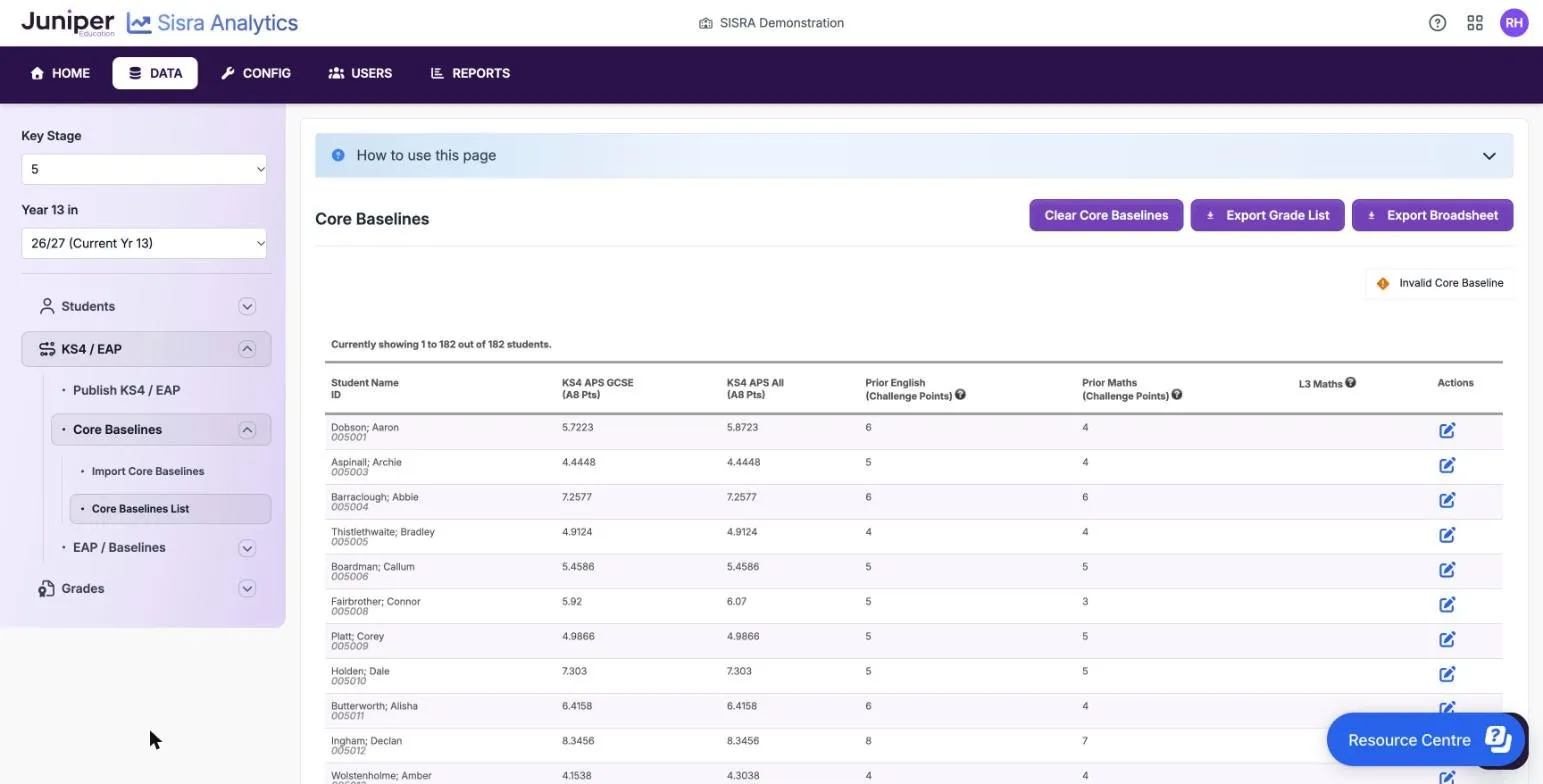
- To correct one value, or set L3 Maths for a student, select the pencil in the student’s row.
- To correct many, select Export Grade List or Export Broadsheet, correct the file and import it again. The export has a row for every student, including those with no baselines.
Invalid values do not stop you publishing KS4 / EAP. When you publish grades with headlines, the Invalid Core Baselines check is a warning for most data sets, but it stops the Exams data set from publishing.
Set up EAP baselines
Section titled “Set up EAP baselines”EAP baselines place students on pathways. Most schools use targets.
- Select KS4 / EAP, then EAP / Baselines, then Uploads, and select Upload Grades File.
- Upload the file as for KS3/4. See Upload the file.
- Select Baseline Management, then Edit.
- Set each new subject’s Grade Type to KS5 Grade Method and choose its Grade Method. For numbers, such as standardised scores, choose Number Range instead.
- Save your changes.
Name each baseline so that staff can tell what it holds, such as Target - Biology. The Baseline Management key shows two warnings, Missing Student Data and Grade Not In Method. Neither stops you publishing, but Sisra leaves the students affected out of on track analysis.
To replace targets, upload the new file before you delete the old one. Replace a baseline file explains why.
Create KS5 EAPs
Section titled “Create KS5 EAPs”KS5 EAPs work like KS3/4 ones, which Set up EAPs for KS3/4 describes. These things differ:
| KS3/4 | KS5 | |
|---|---|---|
| Where | KS2 / EAP > EAP | KS4 / EAP > EAP / Baselines > EAP |
| Baseline field | KS2/Baseline | EAP Baseline |
| Baseline type for targets | KS3/4 Method | KS5 Grade Method |
| Grade methods | One for each year, or each term | One for the whole EAP |
| Expected grades | 16: years 7 to 11 and KS4 Exams | 7: years 12 and 13 and KS5 Exams |
| Columns in an exported EAP | 17 | 8 |
You need at least one EAP for each grade method the cohort uses. A cohort with A levels, AS levels and the Extended Project needs at least three.
For target-based EAPs:
- Upload the targets as EAP baselines, choosing New for every subject on Confirm Upload Qualification Names.
- In Baseline Management, set each target subject to KS5 Grade Method and choose its grade method.
- Select KS4 / EAP, EAP / Baselines, EAP, then Create EAP.
- Choose Create New EAP, enter a name, and choose KS5 Grade Method and the subject’s targets as the EAP Baseline.
- Choose the subject’s grade method in Assessment Methods, and select Create.
- Give each row its own grade in every term, so a target of B expects B throughout.
- Copy the EAP for the other subjects that use the same grade method.
- Choose each qualification’s EAP on the Matching page.
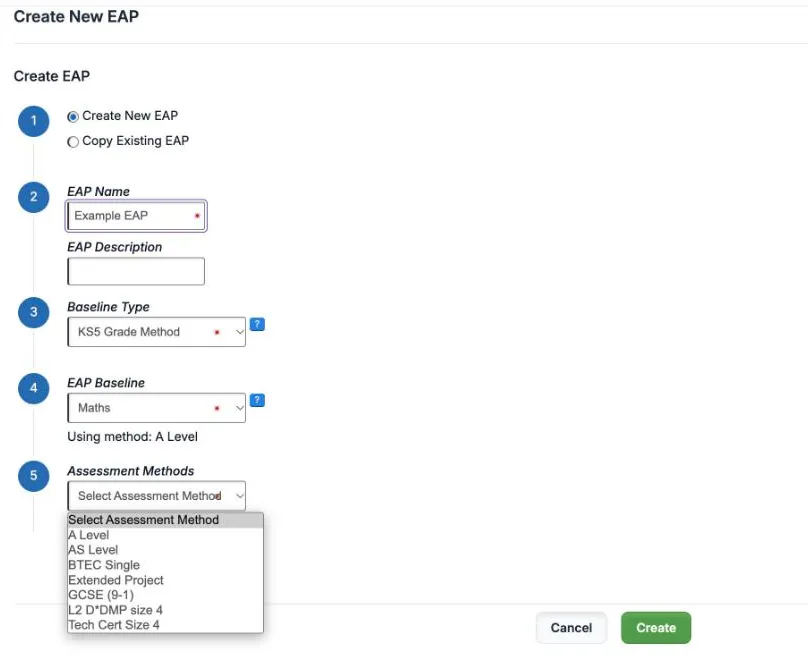
EAP Exceptions and Colour Coding are under KS4 / EAP, then EAP / Baselines. At KS5, colour coding has a switch for each data set.
Publish the baselines and EAPs
Section titled “Publish the baselines and EAPs”Publish KS4 / EAP, then republish the grades. Sisra first checks the four core baselines for values that are not valid. You can publish with them, but fix them before results day. Publish data to the reports gives the steps.
If something goes wrong
Section titled “If something goes wrong”Core Baselines List is unavailable. It opens once a student has a core baseline: “You need to have at least one Core Baseline value for a student to access this section”. Import the baselines first.
There is no value added for applied general qualifications. Check that students have KS4 APS All (A8 Pts), not only KS4 APS GCSE (A8 Pts).
A student is missing from the English or maths progress measure. Their prior challenge points are 4 or more, not valid, or missing.
An EAP will not copy. The new baseline needs the same baseline type and grade method as the original’s.
“Cannot edit - subject in use in an EAP”. Follow Change a baseline that an EAP uses, using the KS5 menus.