


 Sonar Tracker
Baselines and EAPs
Set up KS5 value added
Level 3 value added compares each student’s grades with those of students nationally who had the same KS4 average point score (APS). Sisra Analytics makes the comparison with DfE national data, and you choose which year’s data on the Value Added page. Until the DfE publishes data for a cohort’s own year, the figures are internal estimates.
Before you start
Section titled “Before you start”You need:
- an authority group with Access Data Section, such as Admin
- the students’ KS4 APS GCSE (A8 Pts) and KS4 APS All (A8 Pts) core baselines. A level and academic qualifications use the first, and applied general and tech level ones the second
- the Matching page complete, with a qualification number (QN) in Qual Title and an Expected Attainment Pathway (EAP) for every included qualification
Set up KS5 baselines and EAPs and Match qualifications in KS5 cover these.
Open the Value Added page
Section titled “Open the Value Added page”- Open the KS5 cohort in DATA.
- Select Grades, then National Data, then Value Added.
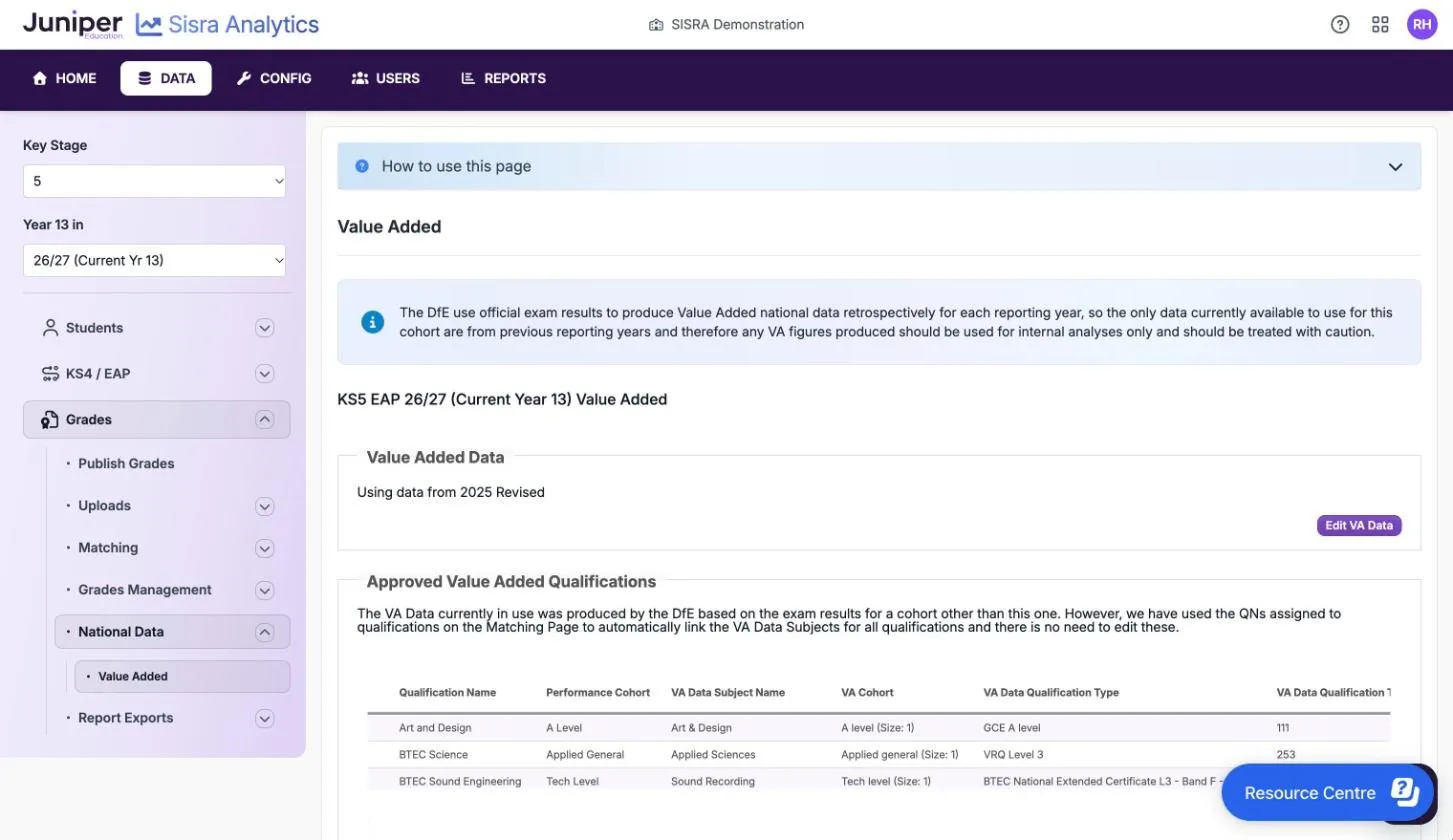
Value Added Data shows the national data in use, such as “Using data from 2025 Revised”. Approved Value Added Qualifications lists each qualification and the national data it is linked to.
A message at the top explains why current figures are estimates. The DfE produces value added national data after each year’s results, so the only data for a current cohort comes from earlier years. The message says such figures “should be used for internal analyses only and should be treated with caution.”
Choose the year of national data
Section titled “Choose the year of national data”For each grade, Sisra finds the points that students nationally with the same KS4 APS averaged in the chosen year’s data. It subtracts them from the grade’s points, then divides by 10 and by the qualification’s size, so the score is in grades. For example, if those students averaged 35 points in an A level, an A (50 points) scores (50 − 35) ÷ 10 ÷ 1 = +1.50. How Sisra calculates the KS5 measures explains the rest of the method.
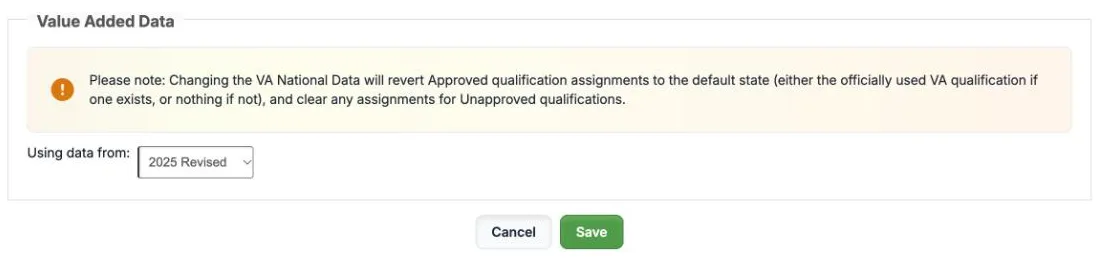
- Select Edit VA Data.
- In Using data from:, choose the year.
- Select Save, then confirm when Sisra asks “Are you sure you want to change the VA National Data?”
Choose the year in which the DfE reports the cohort, if that year is in the list. Otherwise choose the latest year.
| Cohort | Choice as at October 2026 |
|---|---|
| 24/25 (Leavers) | 2025 Revised, the cohort’s own year |
| 25/26 (Leavers) | 2025 Revised, the latest available |
| 26/27 (Current Yr 13) and 27/28 (Current Yr 12) | 2025 Revised, the latest available |
As at 15 October 2026, the list offers 2025 Revised, 2024 Revised, 2019 Amended and 2018 Amended. When data for a later year appears, change to it and republish the grades.
The DfE’s 16 to 19 performance measures include value added for 2024 to 2025 and 2025 to 2026. For a cohort whose own year has no national data yet, Sisra’s figure is not the DfE’s, and it may differ when the DfE publishes.
Check the approved qualifications
Section titled “Check the approved qualifications”An approved qualification is on the DfE’s list for the 16 to 19 performance measures. Sisra links each one to its national data through the QN on the Matching page, so you rarely need to change anything.
| Column | What it shows |
|---|---|
| Qualification Name | The name on the Matching page |
| Performance Cohort | The DfE cohort it counts in, such as A Level or Applied General |
| VA Data Subject Name | The subject in the national data |
| VA Cohort | The national cohort and the qualification’s size, such as A level (Size: 1) |
| VA Data Qualification Type | The DfE qualification type, such as GCE A level |
| VA Data Qualification Type Code | The DfE’s code for that type, such as 111 |
| KS4 Baseline | The core baseline it uses: KS4 APS (GCSE) or KS4 APS (All) |
The table is wider than the page, so scroll sideways to see every column.
A blank row means the chosen year’s national data has nothing for that QN, so the qualification gets no value added. If you are using the cohort’s own year, leave it. If an earlier year is standing in, you can link the qualification to a similar subject:
- Select Edit Approved Qualifications. It appears only when some qualifications are not linked.
- Search VA Data Subject Name by subject name, cohort, qualification type or type code.
- Choose the subject and select Save.
You can link only blank rows by hand, and a link you make yourself may give figures that differ from the DfE’s. Revert to Default Linking removes every link you made by hand. A red icon on a row means the linked national data is a different size from the qualification, so check that link.
Add value added for unapproved qualifications
Section titled “Add value added for unapproved qualifications”An unapproved qualification is one you matched as unapproved on the Matching page. It gets no value added, because it could not be an official figure. To see its value added for internal use:
- At the bottom of the page, set Configure unapproved qualifications: to Yes. The switch appears only when the cohort has unapproved qualifications.
- Select Edit Unapproved Qualifications.
- For each qualification, search VA Data Subject Name, choose a subject and select Save.
- Republish the grades.
Their value added then appears in the Grade Analysis reports, but not in Headlines or the Value Added report. Setting the switch back to No turns it off, and Sisra remembers the links.
Clear the warnings on the page
Section titled “Clear the warnings on the page”| Message | What to do |
|---|---|
| “One or more qualifications have not been matched in the QN/Qual Title column on the Matching page” | Enter a QN for every approved qualification on the Matching page |
| “One or more qualifications do not have an EAP selected on the Matching page” | Choose an EAP for each one. The EAP sets the qualification’s grade method and size. |
| “One or more qualifications have a mismatch on your Matching page, between the QN/Qual Title and the grade method in the selected EAP” | Fix the mismatch, as in Fix a QN/EAP mismatch |
| “There is official Value Added national data available for this cohort…” | Select Edit VA Data and choose the cohort’s own year |
| “You do not have any qualifications that are eligible to count towards Value Added set up on your Matching page” | Check the QNs on the Matching page |
| “No Value Added national data has been selected” | Select Edit VA Data and choose a year |
The first three messages lock the page. Until you fix the Matching page, you cannot change the national data or the links.
Publish with value added
Section titled “Publish with value added”Value added appears only in reports published with Produce DfE-based Headlines figures turned on. The Headlines section of the publish dialog shows the result of these checks:
| Check | Result | What to do |
|---|---|---|
| Official VA national data not in use | Information | The cohort’s own year is available. Choose it in Edit VA Data. |
| Size mismatch between qualification and assigned VA national data | Information | A link you made points to a subject of another size. Check it. |
| No valid values for required KS4 APS baseline | Information | Import KS4 APS GCSE (A8 Pts) and KS4 APS All (A8 Pts). Until you do, there is no value added. |
| No VA national data selected | Information | Choose a year in Edit VA Data. Until you do, there is no value added. |
| Invalid Core Baselines | Warning, or Fail for Exams | Correct the core baselines |
A Health Check Failed result stops publishing; information and warnings do not, so read them before you publish. Publish grades in KS5 covers the dialog.
If something goes wrong
Section titled “If something goes wrong”Value added is missing. Check these in order, then republish:
- The students have the core baseline the qualification needs.
- Value Added Data shows a year.
- The report was published with Produce DfE-based Headlines figures on.
- The qualification is approved, and its row is linked.
- The grade counts. Grades worth no entries get no value added. A discounted grade has value added only in Grade Analysis, not in Headlines or the Value Added report.
A T Level has no value added. The DfE does not publish value added for T Levels, so Sisra has no national data for them.