


 Sonar Tracker
How Sisra works
Data sets, assessment collections and grade types
Every grade in Sisra Analytics sits in a data set or an assessment collection, and each one you publish becomes its own report. Where you put a set of grades, and the grade type and term you give it, decide what the reports can show and compare. Read this page before you plan a year’s data collections.
Two places for grades
Section titled “Two places for grades”Each cohort, at KS3/4 and KS5, has two kinds of place for grades:
- seven standalone data sets, each holding one full set of grades, such as exam results or targets
- Assessments, which holds any number of assessment collections, one for each time you collect grades
An assessment collection is what schools often call a data drop. You cannot add more standalone data sets, but you can create as many collections as you need. Upload grades gives the steps for both.
The standalone data sets
Section titled “The standalone data sets”| Data set | What it holds | Name |
|---|---|---|
| Exams | Official exam results only | Fixed |
| Five general data sets, called Targets, Mocks, Data Set 3, Data Set 4 and Data Set 5 in a new school | One full set of grades each, such as targets, mock results or final predictions | You can rename them |
| TAGs / CAGs | Centre-assessed grades from 2020 and teacher-assessed grades from 2021 | Fixed |
A standalone data set holds one grade for each pupil or student in each qualification. If you upload two sets of grades into one data set, Sisra treats them as two attempts. At KS3/4 the headline figures then count the earlier grade, and the Grades area the better one. At KS5 the better grade counts everywhere. Put a second set of grades in a spare data set or an assessment collection instead.
Several files can go into one data set. A later file adds grades to the earlier ones rather than replacing them. So to refresh a set of grades, such as new targets, upload the new file and then delete the old one.
The Exams data set
Section titled “The Exams data set”Exams is for official results from exam boards, not internal exams or mocks. Its term is fixed as KS4 Exams or KS5 Exams, and its grade type as Exams. Upload results as they arrive, including early entries such as a GCSE taken in year 10, each with its exam date. Sisra needs those dates to work out first entries.
Exams has stricter rules than the other data sets:
- sub-grades, such as 6+, are not valid in it
- it cannot be published until every issue in the publish health check is fixed
- if it is published during the results embargo, only authority groups with View Embargo Reports can see its reports until the embargo ends
- it is the only data set that Sisra Data Collaboration collects from
To see banked results beside current grades, you can also upload them into an assessment collection. For example, add a year 11 cohort’s year 10 exam results to their autumn collection. They must still go into Exams as well.
Renaming data sets
Section titled “Renaming data sets”Rename data sets so that each name says what it holds, such as KS4 Targets or Final Predicted. You can rename the five general data sets and Assessments, for example to Working At. Each key stage has its own page under CONFIG > Data Sets: KS3/4 Data Sets and KS5 Data Sets. A new name applies to every cohort in that key stage, so agree with senior leaders what each data set is for. Republish a data set for its new name to reach the reports.
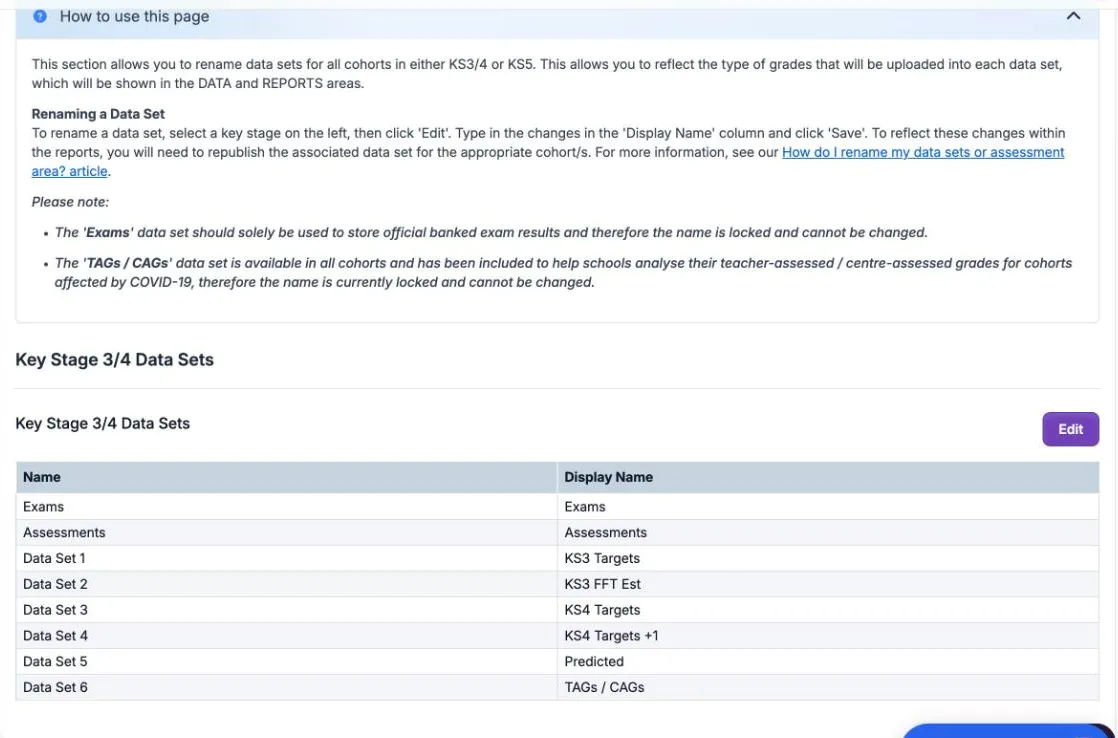
Rename data sets and manage faculties has the steps.
Assessment collections
Section titled “Assessment collections”Assessments tracks grades over time. Create a new collection each time you collect grades, such as Y11 Autumn, and upload that round’s grades into it. Each collection has:
| Field | What it decides |
|---|---|
| Collection Name: | The name of the report |
| Grade Type: | What kind of grades the collection holds. See Grade types |
| Date (dd/mm/yyyy): | The order of the collections, newest first |
| Term: | The term the grades belong to, such as Year 11 Term 1. See Terms |
You can create as many collections as you like, but you can publish only two for each term. There are three terms a year, so a KS3/4 cohort can have up to 30 published collections (5 years × 3 terms × 2). A KS5 cohort can have up to 12 (2 years × 3 terms × 2). The same collection cannot fill both slots for a term.
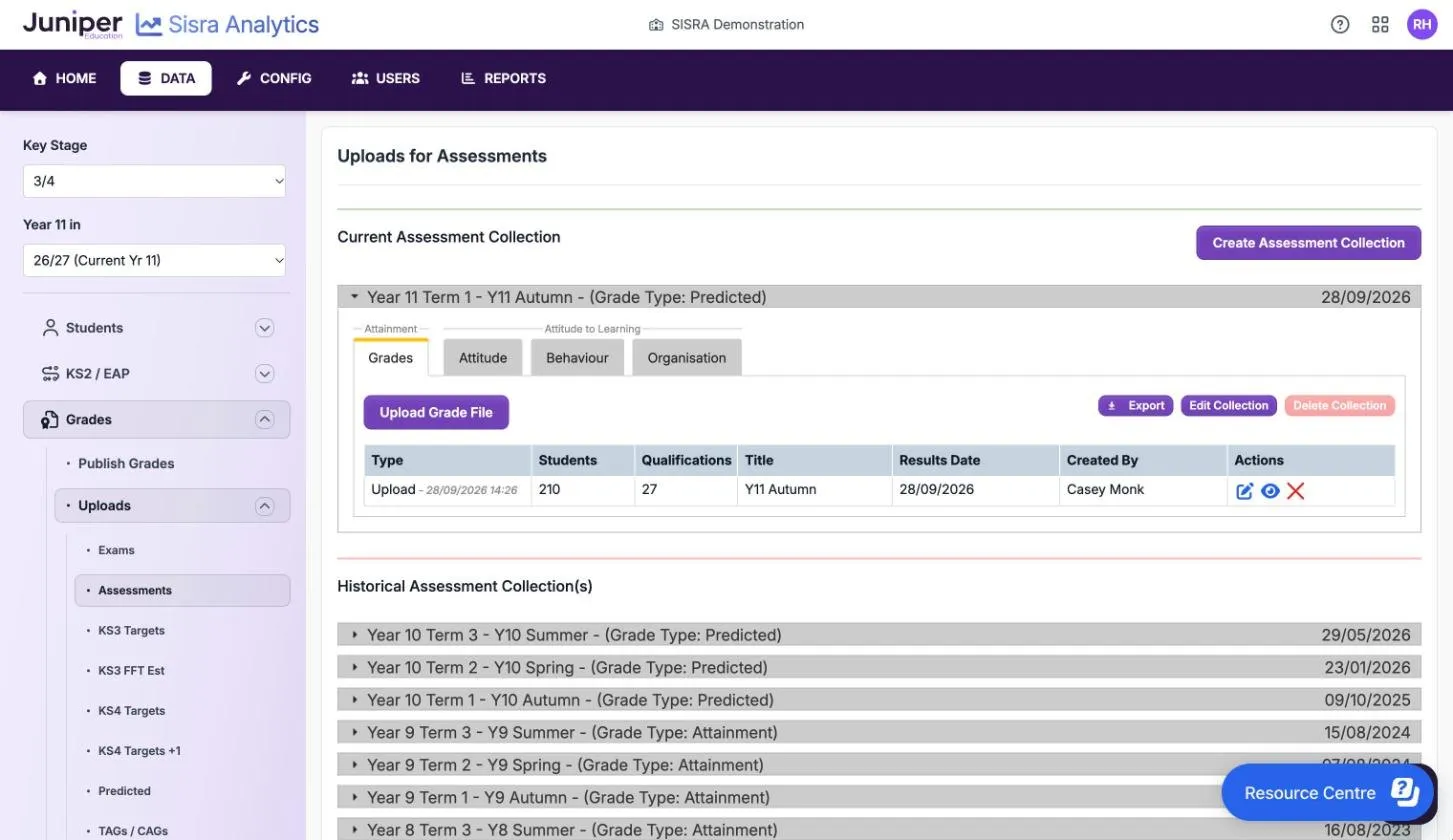
Grade types
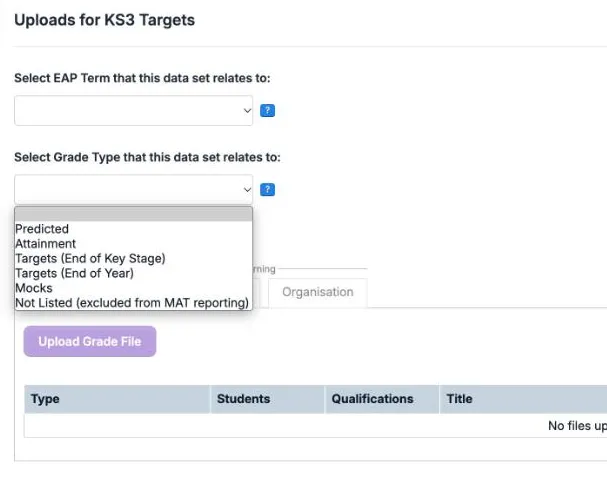
Section titled “Grade types”Every data set and collection has a grade type, which records what kind of grades it holds. On screen, Sisra explains that the grade type identifies what was uploaded, and that Sisra Multi-School needs it. In your school’s own reports it works as a label. Data with the type Not Listed (excluded from MAT reporting) does not reach Multi-School.
| Grade type | What the grades are |
|---|---|
| Attainment | Working-at grades: the standard a pupil or student is working at now, in the work covered so far |
| Predicted | The grade teachers expect at the end of the course |
| Targets (End of Key Stage) | The grade you are aiming for at the end of KS4 or KS5 |
| Targets (End of Year) | The grade you are aiming for at the end of the school year |
| Mocks | Results of mock exams |
| Not Listed (excluded from MAT reporting) | Grades that fit none of the other types |
| Exams | Official exam results. Only the Exams data set has this type |
You choose the grade type on a standalone data set’s upload page, or when you create or edit a collection.
Every data set and collection belongs to a term: the term you collected the grades in, or the term they relate to. At KS3/4 the terms run from Year 7 Term 1 to Year 11 Term 3, then KS4 Exams. At KS5 they run from Year 12 Term 1 to Year 13 Term 3, then KS5 Exams.
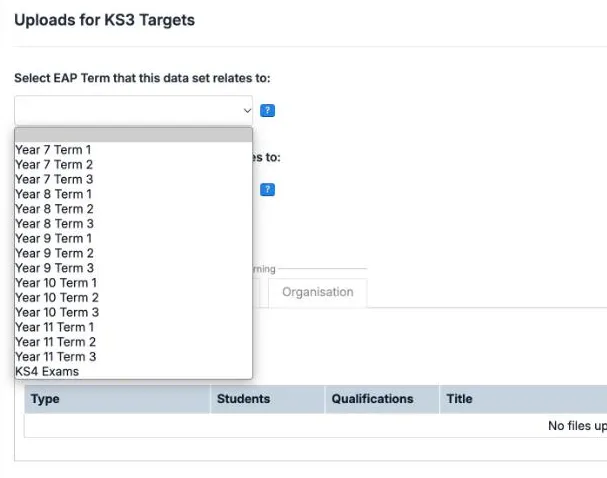
The term decides:
- which expected grades on track compares with, if your Expected Attainment Pathways (EAPs) hold expected grades
- which grade method each qualification uses, as its EAP sets it for that term
- whether the report uses KS3 or KS4 classes, at KS3/4
- where the report appears on the cohort’s tab in REPORTS
So a wrong term does more than put a report in the wrong place. If a qualification’s EAP uses a different grade method in that term, its grades no longer fit and show as Grade Not In Method. End-of-course targets belong in the exams term, KS4 Exams or KS5 Exams. EAPs, flight paths and on track explains how terms and expected grades work together.
Working-at, predicted and target grades
Section titled “Working-at, predicted and target grades”These three kinds of grade answer different questions, so keep them apart.
| Kind of grade | The question it answers | Where it belongs | Grade type |
|---|---|---|---|
| Working-at | What standard is the pupil or student working at now? | A new assessment collection each round | Attainment |
| Predicted | What grade do we expect at the end of the course? | A new assessment collection each round, or a standalone data set for final predictions | Predicted |
| Target | What grade are we aiming for? | A standalone data set, such as Targets. Targets can also be the baselines of your EAPs | Targets (End of Key Stage) or Targets (End of Year) |
| Mock | What did they get in their mock exams? | A standalone data set, or a collection for each mock series | Mocks |
Keep one kind of grade in Assessments for each cohort if you can, and name the collections to match. Comparisons between collections, in the tracker and on flight paths, only mean something when the grades are the same kind. If the kind changes, for example from working-at grades in KS3 to predictions in KS4, read any comparison across the change with care.
The grade type also has to suit your EAPs. Working-at grades compared with a flat line of end-of-course targets put most pupils below track early in the course. Pathway shapes explains why. Good practice with school data covers how many collections to run and how accurate predictions tend to be.