


 Sisra Analytics
Statutory assessment
Enter optional key stage 1 results
End of key stage 1 (KS1) tests and teacher assessment have been optional since the 2023 to 2024 academic year. Schools that still use them can record the results on the End of Key Stage One (optional) page, where they feed later reports.
Before you start
Section titled “Before you start”You need:
- an edit role, such as Full Edit or Partial Edit
- your pupils’ test marks, teacher assessment judgements or both
Why schools still record KS1
Section titled “Why schools still record KS1”The Standards and Testing Agency (STA) still publishes optional key stage 1 tests on GOV.UK and recommends giving them in May. Nothing goes to STA. Schools that record KS1 results do so for their own use, such as tracking progress through key stage 2.
KS1 results appear in:
- the Primary Flight Path report, in the KS1 teacher assessment and KS1 combined columns
- the Assessment Conversion Matrix, which shows progress from KS1 when you choose End of Key Stage 1 TA or End of Key Stage 1 Test
- the KS1 TA (teacher assessment) column on Primary Projection Pathway
- the Key Stage One section of the Statutory Dashboard and the End of Key Stage 1 Outcomes report
- the Triangulate panel on the primary summative page
Open the right year
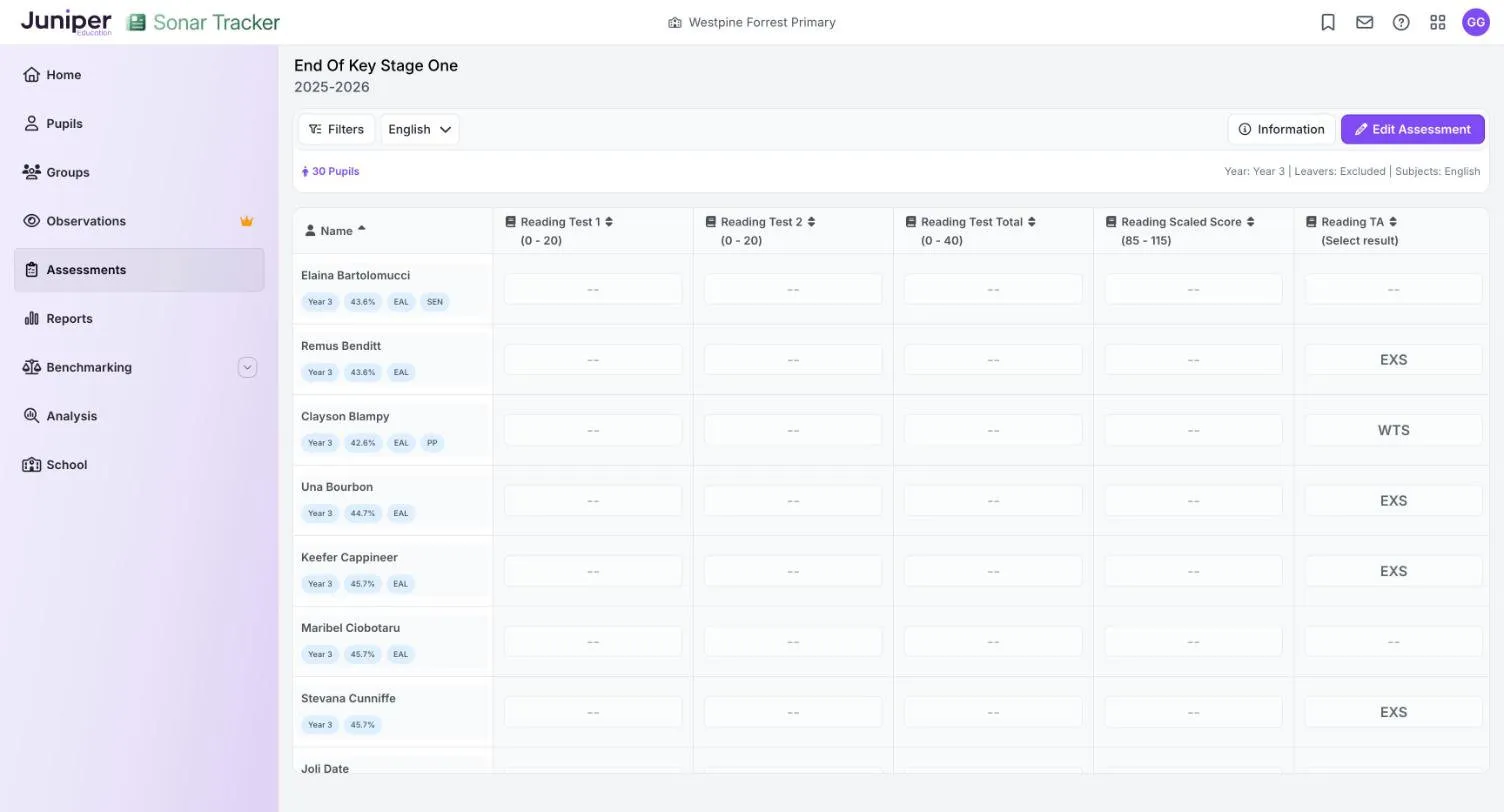
Section titled “Open the right year”The page shows results for the academic year in which the pupils were in year 2, so choose the pupils’ current year group. Year 2 shows this year’s cohort. In the 2026 to 2027 academic year, Year 3 opens the results for 2025-2026, when those pupils were in year 2. The academic year under the page heading shows which year you are looking at.
Enter results
Section titled “Enter results”- Go to Assessments.
- In the Statutory Assessments card, select End of Key Stage One (optional).
- In the Select Pupils box, choose Year 2 from the Year Group list.
- Select Open Assessment.
- Choose English, Mathematics or Science from the subject list.
- Select Edit Assessment.
- In Assessment Date, enter the date of the tests or of the teacher assessment.
- Select Start Editing.
- Select a cell and enter a mark, or choose a code.
Each result saves as soon as you enter it. Sonar adds up the test totals for you and, once that year’s conversion tables are in, works out the scaled scores. KS1 scaled scores run from 85 to 115, and 100 or more meets the expected standard.
What each view shows
Section titled “What each view shows”The subject list has four views. Columns ending in TA hold teacher assessment.
English
Section titled “English”| Column | What it holds |
|---|---|
| Reading Test 1 and Reading Test 2 | The marks for the two reading papers, 0 to 20 each |
| Reading Test Total | The reading total, out of 40 |
| Reading Scaled Score | The reading scaled score, 85 to 115 |
| Reading TA | Reading teacher assessment |
| Reading Outcome | AS, NS or a code explaining a missing mark |
| Spelling Test and GPV Test | The spelling paper and the grammar, punctuation and vocabulary questions paper, 0 to 20 each |
| GPS Test Total | The grammar, punctuation and spelling (GPS) total, out of 40 |
| GPS Scaled Score | The GPS scaled score, 85 to 115 |
| GPS Outcome | AS, NS or a code explaining a missing mark |
| Writing TA | Writing teacher assessment |
Mathematics, Science and Summary
Section titled “Mathematics, Science and Summary”Mathematics holds the maths test marks and scaled score, the test outcome and maths teacher assessment. Science holds science teacher assessment.
Summary shows one result per pupil for each subject: the scaled score if the pupil took the test, otherwise the teacher assessment. It is read-only.
KS1 codes
Section titled “KS1 codes”Select Information on the page to see the codes for the subject you are viewing.
Teacher assessment
Section titled “Teacher assessment”Reading, writing and maths use these codes:
| Code | Meaning |
|---|---|
| GDS | Working at greater depth at the expected standard |
| EXS | Working at the expected standard |
| WTS | Working towards the expected standard |
| PK1 to PK4 | Pre-key stage standards 1 to 4 |
| EM | Engagement model, for pupils working below PK1 |
| A | Absent, or arrived too recently for a judgement |
Science uses EXS (working at the expected standard), HNM (has not met the expected standard) and A (absent).
The pre-key stage standards are for end of key stage assessment only, so Sonar offers them only on the statutory pages. Assess pupils working below their year group covers judgements during the year.
Test outcomes
Section titled “Test outcomes”Reading, GPS and maths outcomes use these codes:
| Code | Meaning |
|---|---|
| AS | Achieved standard |
| NS | Not achieved standard |
| A | Absent |
| B | Working below the standard of the test |
| J | Recently arrived in the school |
| L | Left |
| M | Missing |
| U | Unable to access test |
| F | Pupil will take the test in the future |
| P | Pupil has taken the test in the past |
If something goes wrong
Section titled “If something goes wrong”The page shows a different year from the one you expected. The page follows the pupils’ current year group, so Year 3 shows last year’s KS1 results. Choose Year 2 for this year’s cohort.
Scaled scores are empty. Juniper Education adds each year’s conversion tables after STA publishes them. Until then, Sonar cannot work out scaled scores.
A pupil is missing. New pupils arrive from your management information system (MIS) overnight, and leavers are hidden unless you change the Leavers filter. See Include leavers.