


 Sisra Analytics
Reports
Target and projection reports
Target Analysis compares pupils’ judgements with their targets, and Projection Summary counts teachers’ end-of-year projections. A target is what the teacher would like a pupil to reach. A projection is where the pupil is likely to end up if nothing dramatic changes. Both reports need that data entered first: see Set targets and end-of-year projections.
Target Analysis
Section titled “Target Analysis”Primary Target Analysis compares each pupil’s judgement at one assessment point with the target set for that point. It shows who is below, on or ahead of target. EYFS (2020) Target Analysis does the same for nursery and reception, with goals in place of subjects. Both open from Reports.
Options
Section titled “Options”| Option | What it does | Default |
|---|---|---|
| Academic year list | The year | The current year, such as 2026-2027 |
| Term list | The assessment point whose judgements and targets are compared | The current point, such as Autumn 1 |
| Subject list, such as 3 Subjects | The subjects | Reading, writing and maths |
| Display Options | Summary View, Names, Combined, KPIs, Overview Table, Chart and Pupil Table | KPIs, Overview Table, Chart and Pupil Table ticked |
Change what a report shows explains each display option.
Read the report
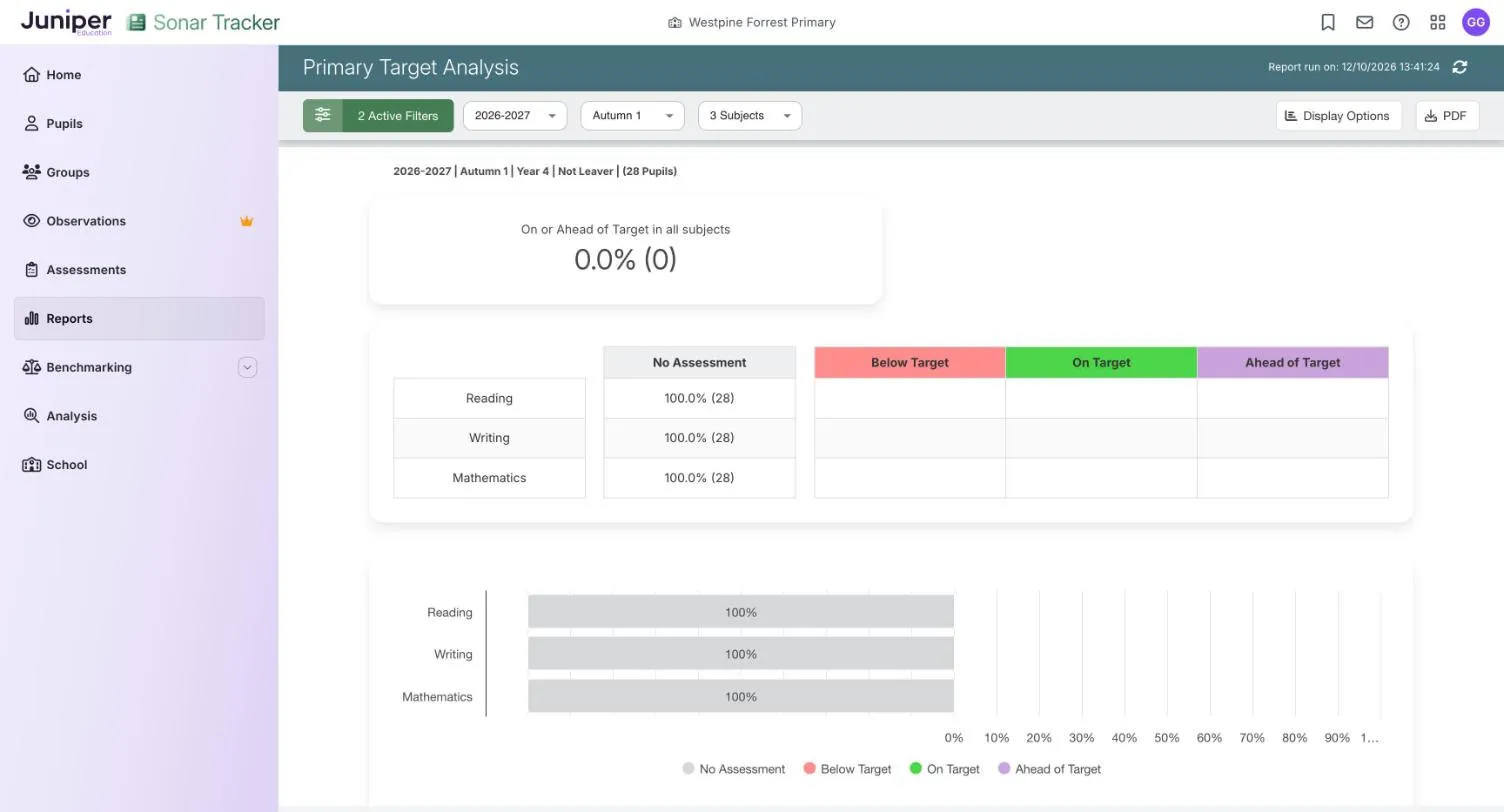
Section titled “Read the report”The tile On or Ahead of Target in all subjects gives the share of pupils on or ahead of target in every subject shown. Below it, a table and chart split each subject by these colours:
| Colour | Meaning |
|---|---|
| No Assessment grey | The target, the judgement or both are missing for this point |
| Below Target red | The judgement is lower than the target |
| On Target green | The judgement matches the target |
| Ahead of Target purple | The judgement is higher than the target |
The Pupil Table gives each pupil’s Assessment, Target and Difference in each subject. Difference counts how many judgements apart the two are. It shows 0 on green when on target, a positive number on purple when ahead and a negative number on red when behind. A target of Securely At with a judgement of Just At gives -1.
In the demo school, year 4 at autumn 1 shows No Assessment 100.0% (28) in reading, writing and maths. On or Ahead of Target in all subjects is 0.0% (0), because no pupil has an autumn 1 target. The school’s only target is Douglas Allison’s summer 2 reading target of Securely At. Choose Summer 2 and it appears in the Pupil Table, with no judgement beside it yet.
Points to watch
Section titled “Points to watch”The report fills only when pupils have a target and a judgement for the same assessment point. If your school sets targets for summer 2 only, choose Summer 2, and the report fills as summer 2 judgements go in. To use it earlier in the year, set targets for those points too, because Sonar cannot copy targets from one term to the next.
No Assessment does not say whether the target or the judgement is missing, but the Pupil Table does. It is also a share of all the pupils selected, while the other columns count only pupils with both. Read the numbers in brackets as well as the percentages.
A pupil below an ambitious target may still be on track for the end of the year: Age Related Overview shows who is. For pupils working below their year group, a target in their own band shows progress that other reports miss. See Assess pupils working below their year group.
Projection Summary
Section titled “Projection Summary”Primary Projection Summary and EYFS Projection Summary count the end-of-year projections teachers record on Primary Projection Pathway and EYFS Projection Pathway. Not every school has them: if Search Reports does not find them, yours does not.
Options
Section titled “Options”Choose the academic year and one or more subjects, or early learning goals in the EYFS version. Filters narrows the pupils.
Read the report
Section titled “Read the report”For each subject, the primary report gives the number and percentage of pupils with each projected judgement. An at-or-above figure counts every pupil projected to be at or above age-related expectations (ARE), and a combined row covers all the subjects you chose. The EYFS version does the same for the goals you choose and adds a projected good level of development (GLD).
Points to watch
Section titled “Points to watch”A projection changes only when a teacher changes it on Projection Pathway. Before you rely on the percentages, ask when the projections were last reviewed and check that every pupil has one.
A projected GLD is an estimate made during the year. The statutory GLD comes from the EYFS profile at the end of reception: see End of Reception Outcomes.