


 Sisra Analytics
Teacher assessment
Assess pupils working below their year group
Some pupils work on an earlier year group’s curriculum in one or more subjects. Many of them have SEND, but not all. Sonar lets you record their judgements against the band they are working in, so their records show what they can do.
Before you start
Section titled “Before you start”You need:
- an edit role, such as Full Edit or Partial Edit
- to agree with your special educational needs co-ordinator (SENCO) and assessment lead which band each pupil is working in
Use the same approach in every class, so that reports compare like with like.
Record a judgement from a lower band
Section titled “Record a judgement from a lower band”You can do this on Primary Summative Assessment (New) and EYFS Summative Assessment (New).
- Select the pupil’s cell under the subject.
- Select View All Codes.
- Find the row for the band the pupil is working in, such as Band 2 for the year 2 curriculum.
- Choose the code in that row: B (Below), JA (Just At), At (Securely At) or A (Above).
Sonar saves the judgement straight away. To go back to the short list without choosing, select Back.
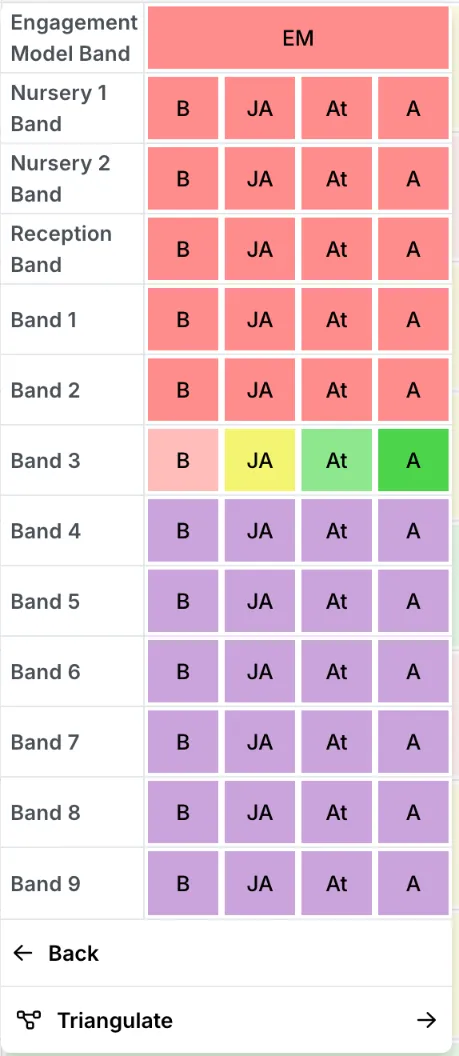
The grid then shows the band number first, such as 2JA for Just At in Band 2. Lower bands show in red and higher bands in purple. Within the band, the codes keep their usual meanings. 2JA means the pupil is on track against the year 2 curriculum taught so far, but only narrowly.
Use a lower band only when the pupil is working on that year group’s curriculum. Below in the pupil’s own band means something different: they are working on their own year group’s curriculum but are not on track.
Older pages, such as Primary Targets, EYFS (2020) Targets and EYFS (2020) Summative 7 Areas of Learning, call the same option Show All Codes. For nursery and reception children, see Children working in a lower band.
The engagement model and pre-key stage standards
Section titled “The engagement model and pre-key stage standards”The View All Codes grids on both summative pages start with Engagement Model Band, which has one code, EM. It is for pupils who are not yet engaged in subject-specific study, the group the DfE’s engagement model was written for. Like other lower bands, it shows in red, and reports count it as Significantly Below.
The pre-key stage standards are statutory assessments for the end of KS1 and KS2. The DfE says they are not for tracking progress during a key stage, so Sonar offers them only on the statutory pages, alongside EM:
| Statutory page | Codes |
|---|---|
| End of Key Stage One (optional) | PK1 to PK4, and EM for the engagement model |
| End of Key Stage Two | PK1 to PK6, and EM for the engagement model |
During the key stage, record a judgement from the band the pupil is working in. See Key stage 1 (optional) and Key stage 2.
How reports show these pupils
Section titled “How reports show these pupils”Reports that use age-related expectations (ARE) count every judgement from a lower band as Significantly Below, whatever the code within the band. So a pupil can make good progress within their band and still show as Significantly Below at every assessment point.
Reports that compare categories between two points, such as Summative Progress Analysis (ARE) and Primary Pupil Progress Meeting, treat the same category as expected progress. They show a pupil who stays Significantly Below as making expected progress, whether or not the pupil has moved on.
Two reports show more of what these pupils achieve:
- Summative Progress Analysis, the report without (ARE) in its name, counts how many codes a pupil has moved, within or between bands
- Target Analysis compares each pupil’s judgement with the target you set for them
For example, Uta Hunter in 4 Ruby works on the year 3 reading curriculum. She is judged 3JA at autumn 2 and 3At at summer 2. Summative Progress Analysis (ARE) counts her as Significantly Below at both points, so it shows expected progress. Summative Progress Analysis shows that she has moved up one code.
Progress reports and Target Analysis describe these reports. To look at these pupils together, filter by SEN or put them in a group: see Filter pupils and Create and manage groups.
Track small steps of progress
Section titled “Track small steps of progress”Alongside summative judgements, use formative assessment, individual targets or both.
Use formative assessment in the pupil’s band
Section titled “Use formative assessment in the pupil’s band”On Primary Formative or EYFS Formative, choose the band the pupil is working in from the Band list. Record their objectives from that band as you teach them. Formative Progress Analysis then compares the share of the band’s objectives each pupil has achieved at two points; choose the same band in the report. See Record formative assessment.
Set individual targets
Section titled “Set individual targets”Set each pupil a target in their own band on Primary Targets or EYFS (2020) Targets, using Show All Codes. Target Analysis then shows whether they are below, on or ahead of it at each point you set targets for. See Set targets and end-of-year projections.
Talk about these pupils’ progress
Section titled “Talk about these pupils’ progress”The progress these pupils make may never show as movement between bands. In pupil progress meetings and governors’ reports, start from what each pupil can now do, using their formative records and targets. Use Summative Progress Analysis and Target Analysis rather than percentages at age-related expectations. These groups are often small, so give counts with percentages and leave names out of governors’ papers (Take care with small groups).
If something goes wrong
Section titled “If something goes wrong”The band you need is not in the list. Select View All Codes to see every band.
A pupil shows expected progress but has not moved on. Reports that compare categories cannot show progress within a band: see How reports show these pupils.
There are no pre-key stage codes on the summative page. That is by design. Enter them on the statutory pages at the end of the key stage.
A pupil shows in the wrong year group. Sonar takes each pupil’s year group from your management information system (MIS). Ask your school office to check the pupil’s national curriculum year there.