


 Sisra Analytics
Reports
Pupil and class reports
These four reports name each pupil, so you can see who is behind a figure. All four open from Reports and exclude leavers unless you change the Leavers filter. Find and run reports explains how to choose pupils, filter, print and save a PDF.
Pupil Progress Meeting
Section titled “Pupil Progress Meeting”Primary Pupil Progress Meeting places each pupil in a class under their judgement in one subject. An arrow shows whether the judgement has moved since an earlier assessment point. It covers years 1 to 6 and is designed for one class.
Options
Section titled “Options”| Option | What it does | Default |
|---|---|---|
| First assessment point list | The start point that each arrow compares with | The point before the end point, such as 2026-2027 Start of Year Baseline |
| Second assessment point list | The end point, whose judgements place pupils in columns | The current point, such as 2026-2027 Autumn 1 |
| Subject list | The one subject shown | Reading |
Read the report
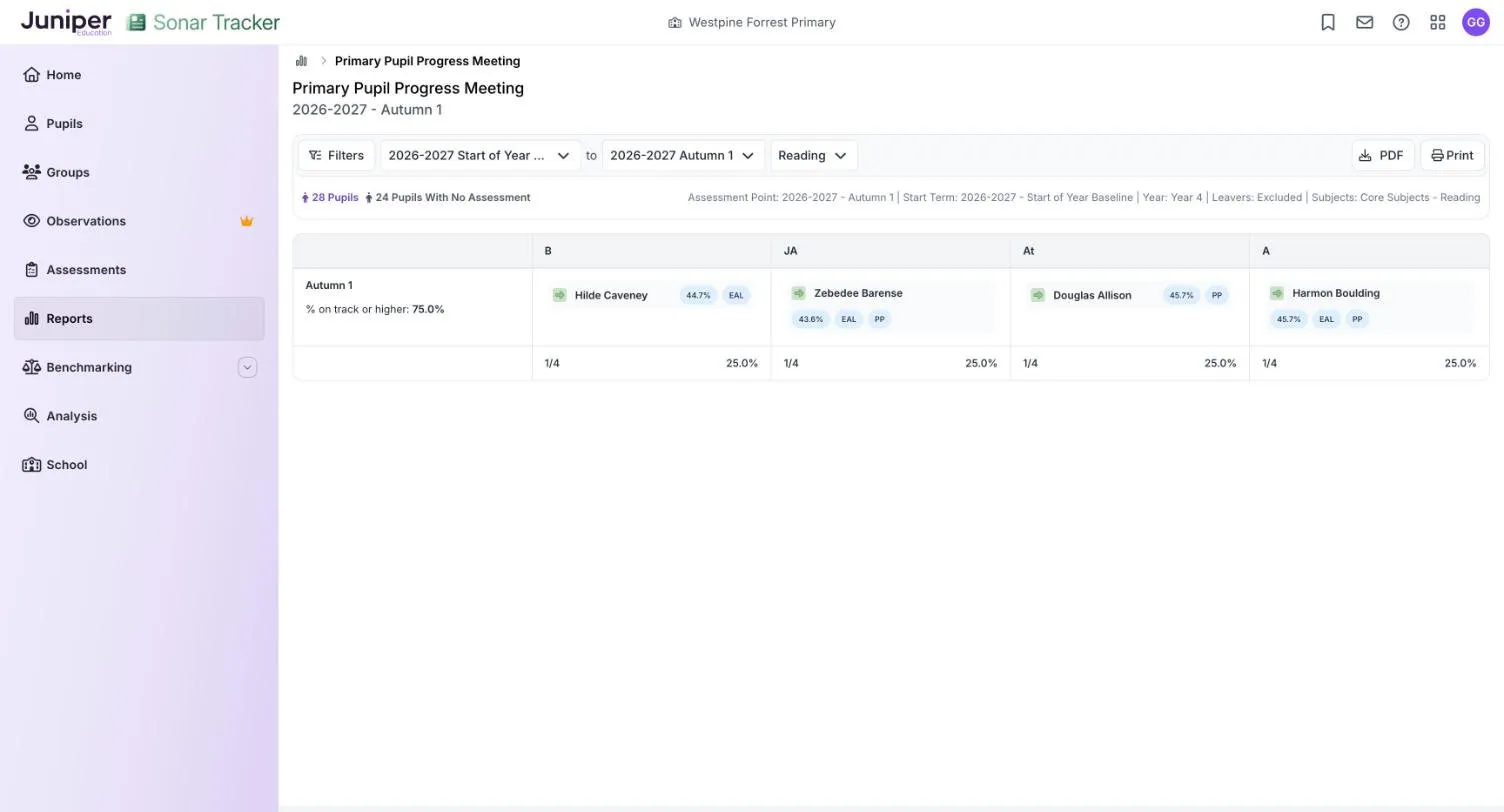
Section titled “Read the report”Pupils sit in columns by their judgement at the end point: B (Below), JA (Just At), At (Securely At) and A (Above). Under each column are its count and percentage, for example 1/4 and 25.0%. The row label names the end point, here Autumn 1. It also gives % on track or higher, the share of pupils shown who are Just At or higher.
Each card shows attendance and flags from your management information system (MIS), such as EAL (English as an additional language) and PP (pupil premium). The arrow beside the name compares the judgement with the one at the start point:
| Arrow | Meaning |
|---|---|
| Purple | Higher than at the start point, such as Securely At after Just At: more than expected progress |
| Green | The same judgement as at the start point: expected progress |
| Red | Lower than at the start point, such as Just At after Securely At: less than expected progress |
Take the demo school’s year 4 reading, from the start of year baseline to autumn 1. The counts read 28 Pupils and 24 Pupils With No Assessment. The 4 pupils left sit one to a column, from Hilde Caveney under B to Harmon Boulding under A, and all four have green arrows. % on track or higher is 75.0%: 3 of the 4.
Points to watch
Section titled “Points to watch”Only pupils with a judgement at the end point appear, and every percentage is a share of them, not of the class.
Check the start point before you read the arrows. In the demo, Douglas Allison has no reading judgement at the start of year baseline, yet his arrow is green.
A pupil judged in a lower band at both points keeps a green arrow whatever they have learned. Follow their progress with Summative Progress Analysis or their targets: see Assess pupils working below their year group.
An arrow is a prompt, not a verdict: a move of one judgement can be normal variation between teachers’ judgements. Look at the pupil’s work first. Use data to ask questions suggests what to bring to the meeting.
Flight Path
Section titled “Flight Path”Primary Flight Path records each pupil’s attainment in one subject from reception to the current assessment point, with their statutory results along the way. Use it at transition, before pupil progress meetings or to follow a cohort over time.
Options
Section titled “Options”| Option | What it does | Default |
|---|---|---|
| Assessment point list | The latest point shown. Later columns are hidden. | The current point |
| Subject list | The subject, which also changes the statutory columns | Reading |
Read the report
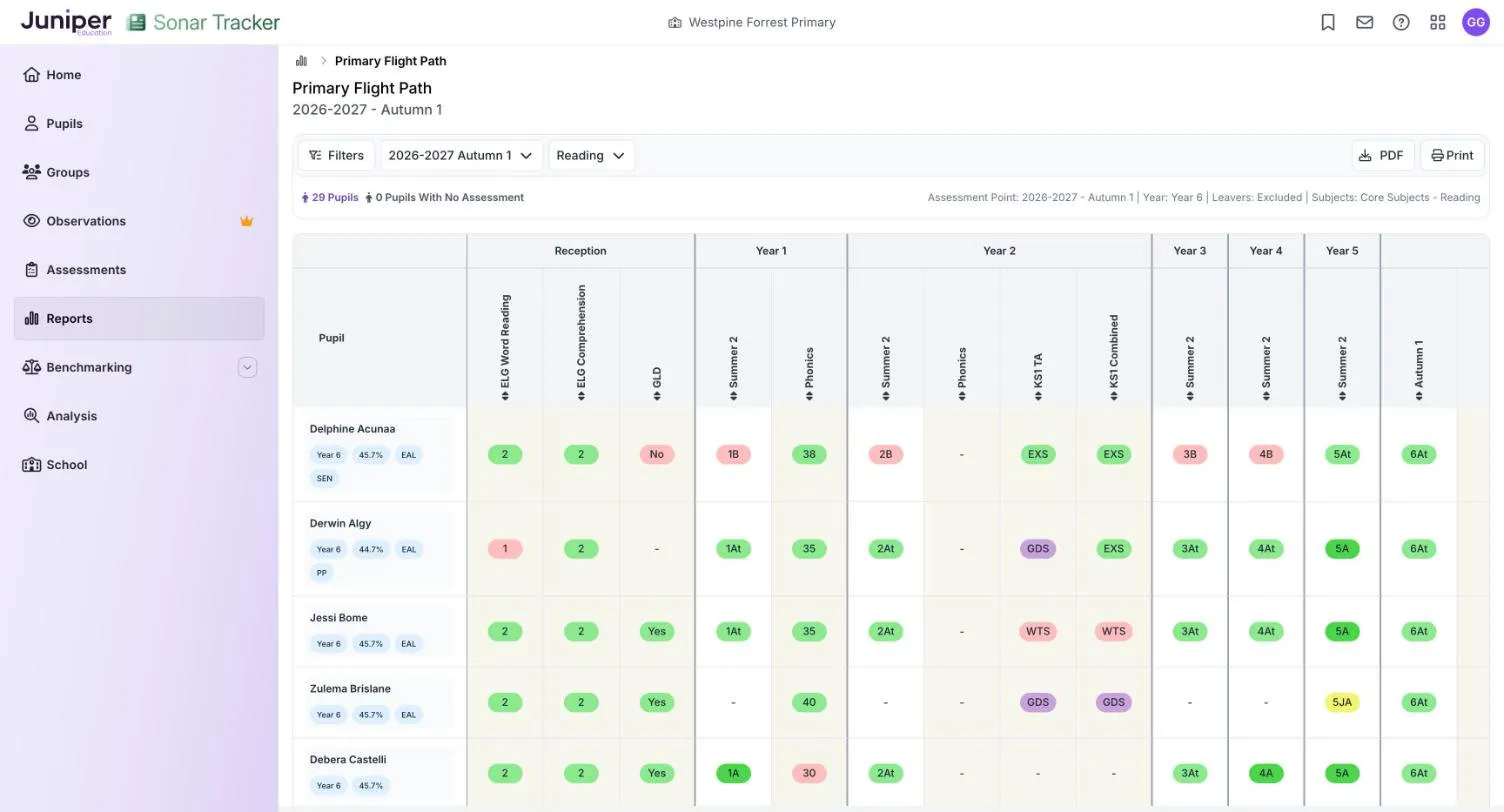
Section titled “Read the report”Columns run in time order under year headings, from Reception to the current year. Each earlier year from year 1 shows its Summer 2 judgement, and statutory results sit under the year they were taken:
- reception: the early learning goals (ELGs) for the subject, such as ELG Word Reading, and GLD (good level of development)
- year 1: the phonics screening check mark, under Phonics
- year 2: any phonics retake, KS1 TA (KS1 teacher assessment) and KS1 Combined, where your school assessed KS1
- year 4, for mathematics: the multiplication tables check score
The current year shows the latest assessment point, plus Start of Year Baseline and End of Year Projection where pupils have them. Judgements show their band first, so 5At is Securely At in Band 5, and a dash means no result. KS1 teacher assessments use the statutory standards: working towards the expected standard (WTS), working at the expected standard (EXS) and working at greater depth (GDS).
| Colour | Meaning |
|---|---|
| 4B pink | Below, or under the expected level: an ELG of 1 (emerging), No for GLD, WTS or a phonics mark under the threshold |
| 5JA yellow | Just At |
| 6At light green | Securely At, or at the expected level: an ELG of 2 (expected), Yes for GLD, EXS or a phonics mark that meets the threshold |
| 5A green | Above |
| GDS purple | GDS, or a judgement from a band above the year group |
| 2JA red | A judgement from a band below the year group, such as 2JA in a Year 3 column |
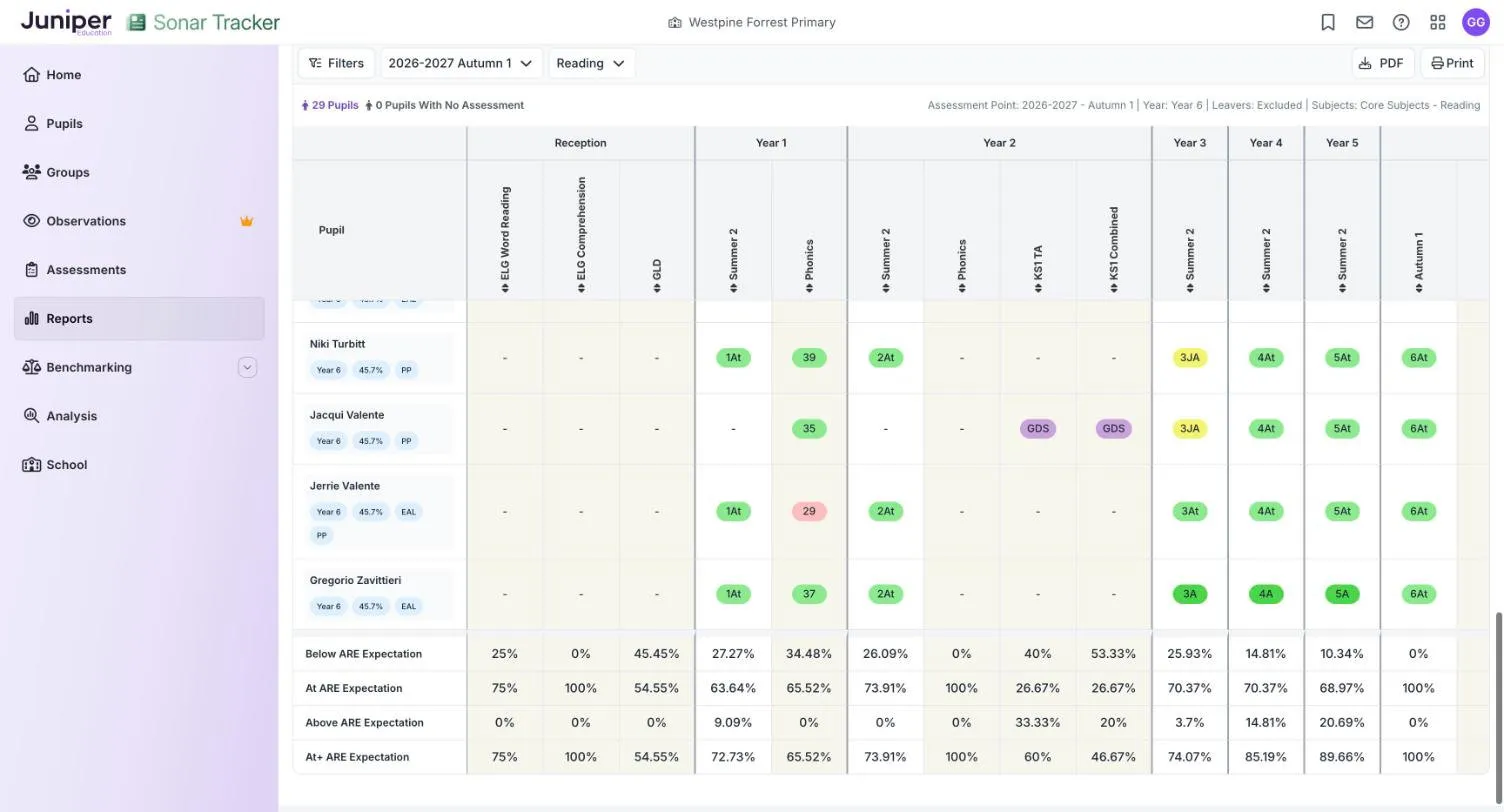
Four rows at the foot of each column give percentages, from Below ARE Expectation to At+ ARE Expectation (at or above). ARE means age-related expectations. In the demo school’s year 6 reading, the year 5 Summer 2 column reads 10.34% below, 68.97% at and 20.69% above. Its At+ ARE Expectation is 89.66%.
Delphine Acunaa was Below at the end of years 1 to 4 (1B to 4B). She was 5At at the end of year 5 and is 6At at autumn 1. Her KS1 TA is EXS, although her summer judgement in year 2 was 2B: a mismatch worth raising with the teachers involved.
Points to watch
Section titled “Points to watch”Each summary figure is a share of the pupils with a result in that column, so neighbouring columns can describe different pupils. In the demo, only 15 of the 29 pupils have a KS1 teacher assessment, so the KS1 TA percentages describe those 15. In that column, WTS counts as below, EXS as at and GDS as above. ELG and GLD columns always show 0% above, because those results have no above.
A pupil who joined the school later shows dashes for earlier years, unless their statutory results were imported. KS1 assessment has been optional since the 2023 to 2024 academic year, so younger cohorts may have no KS1 results.
Triangulation of Data Analysis
Section titled “Triangulation of Data Analysis”Use Primary Triangulation of Data Analysis to see whether a pupil’s statutory results, formative codes and summative judgement tell the same story. It helps before moderation or when you plan support, and covers one subject and one band for one year group or class.
Options
Section titled “Options”| Option | What it does | Default |
|---|---|---|
| Assessment point list | The point for the judgement, the formative codes and any targets or test scores | The current point |
| Band | The band whose formative objectives are counted | The band for the year group, such as Band 4 |
| Subject list | Reading, writing or maths | Reading |
Read the report
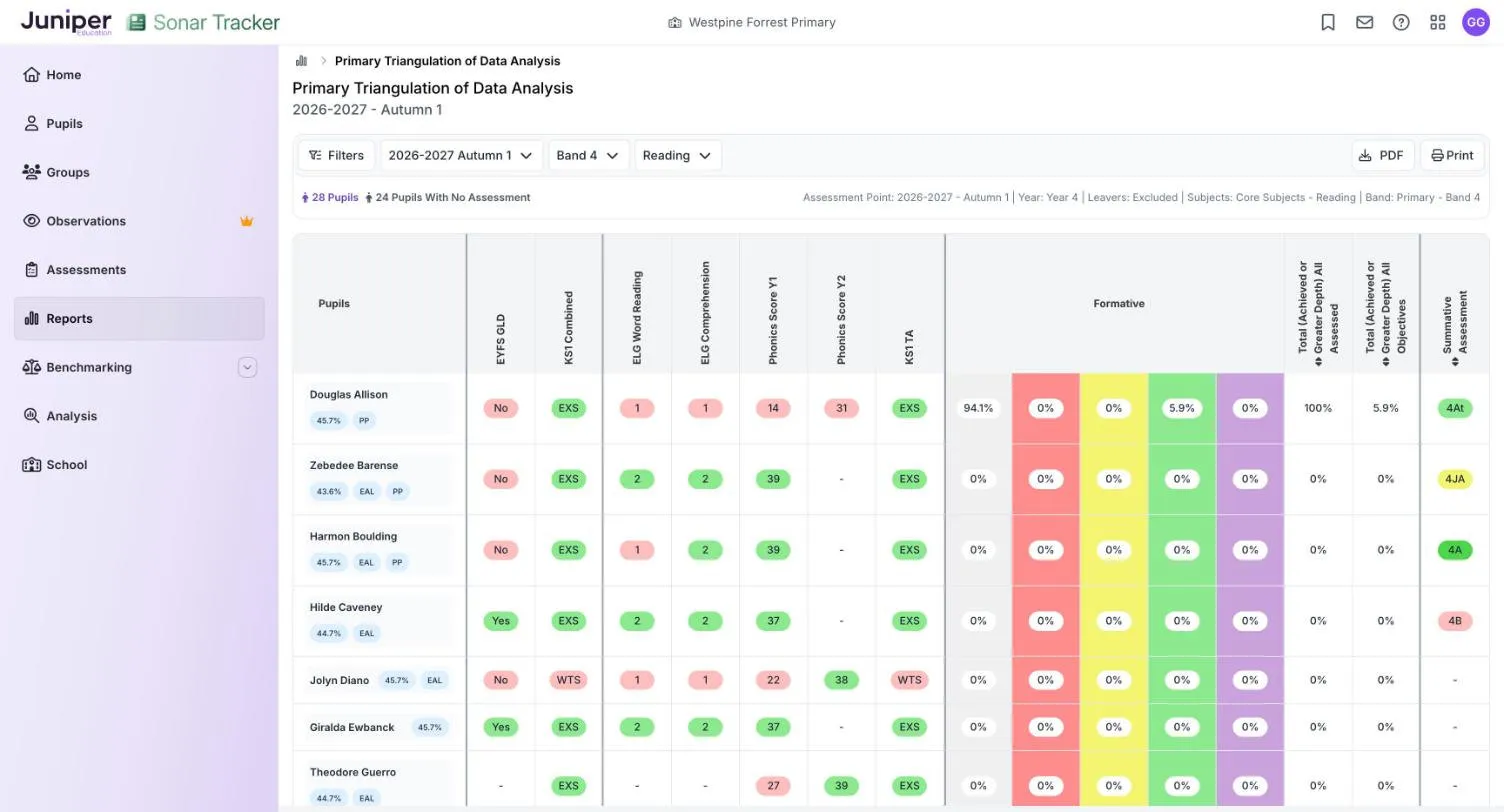
Section titled “Read the report”Pupils with no judgement at the assessment point still appear, with a dash. For reading, the columns are:
| Column | What it shows |
|---|---|
| EYFS GLD | Yes or No for a good level of development |
| KS1 Combined | KS1 result for reading, writing and maths combined, where recorded |
| ELG Word Reading, ELG Comprehension | Early learning goal results: 2 (expected) or 1 (emerging) |
| Phonics Score Y1, Phonics Score Y2 | Phonics screening check marks, with Y2 for a retake |
| KS1 TA | KS1 teacher assessment in the subject |
| Formative | Five percentages: the share of the band’s objectives at each formative code |
| Total (Achieved or Greater Depth) All Assessed | The share of objectives assessed so far that are Achieved or Greater Depth |
| Total (Achieved or Greater Depth) All Objectives | The same, as a share of all the band’s objectives in the subject |
| Summative Assessment | The judgement at the assessment point, such as 4At |
Writing and maths show their own statutory columns. Termly Target, Test Scores and End of Year Projection columns appear when pupils have them.
The five Formative columns have no labels on screen. In order, they are:
| Colour | Formative code |
|---|---|
| Not taught grey | Not taught or pupil was absent |
| Taught red | Taught |
| Working Towards yellow | Working Towards |
| Achieved green | Achieved |
| Greater Depth purple | Greater Depth |
Statutory results and judgements use the colours in the Flight Path key.
In the demo school’s year 4 reading at autumn 1, Douglas Allison has 1 of the 17 Band 4 reading objectives coded Achieved. His Formative columns show 5.9% green and 94.1% grey for the other 16. All Assessed is 100%, because the one objective assessed so far is achieved, while All Objectives is 5.9%. Read the two together.
Hilde Caveney reached GLD, scored 37 in the phonics check and was EXS at KS1, yet her autumn 1 judgement is 4B (Below). Look at her work before you decide which evidence to trust.
Points to watch
Section titled “Points to watch”For a pupil working in another band, choose that band, or the formative columns describe objectives they are not working on.
A pupil with no formative codes in the band shows 0% in all five colours, not 100% grey.
Do not work out a summative judgement from the formative percentages: a pupil can achieve most objectives taught so far and still not be secure. See Record formative assessment.
Single Pupil Overview
Section titled “Single Pupil Overview”Single Pupil Overview puts one pupil’s statutory results, context and teacher assessments on one page. Reports suggests it under Parents Evening and Report Writing.
- Go to Reports, then select Single Pupil Overview.
- In the Select Pupils box, choose a year group from Year Group or a class from Class.
- Choose the pupil from the Pupils list.
The report opens as soon as you choose the pupil. Pupils stays greyed out until you have chosen a year group or class. Selecting a pupil’s name in some other reports, such as Age Related Overview, also opens it.
Options
Section titled “Options”| Option | What it does | Default |
|---|---|---|
| Academic year list | The year the report covers | The current year, such as 2026-2027 |
| Subject list, such as 3 Subjects | The subjects shown | Reading, writing and maths |
| Term list, such as 2/3 Terms | The assessment points shown as rows. Tick Previous Summer to add the end of last year. | The points so far this academic year, without Previous Summer |
| Band list | The band, for a pupil working in another band | The pupil’s band, such as Band 4 |
The class and year group lists show where the pupil is now, and you cannot change them.
Read the report
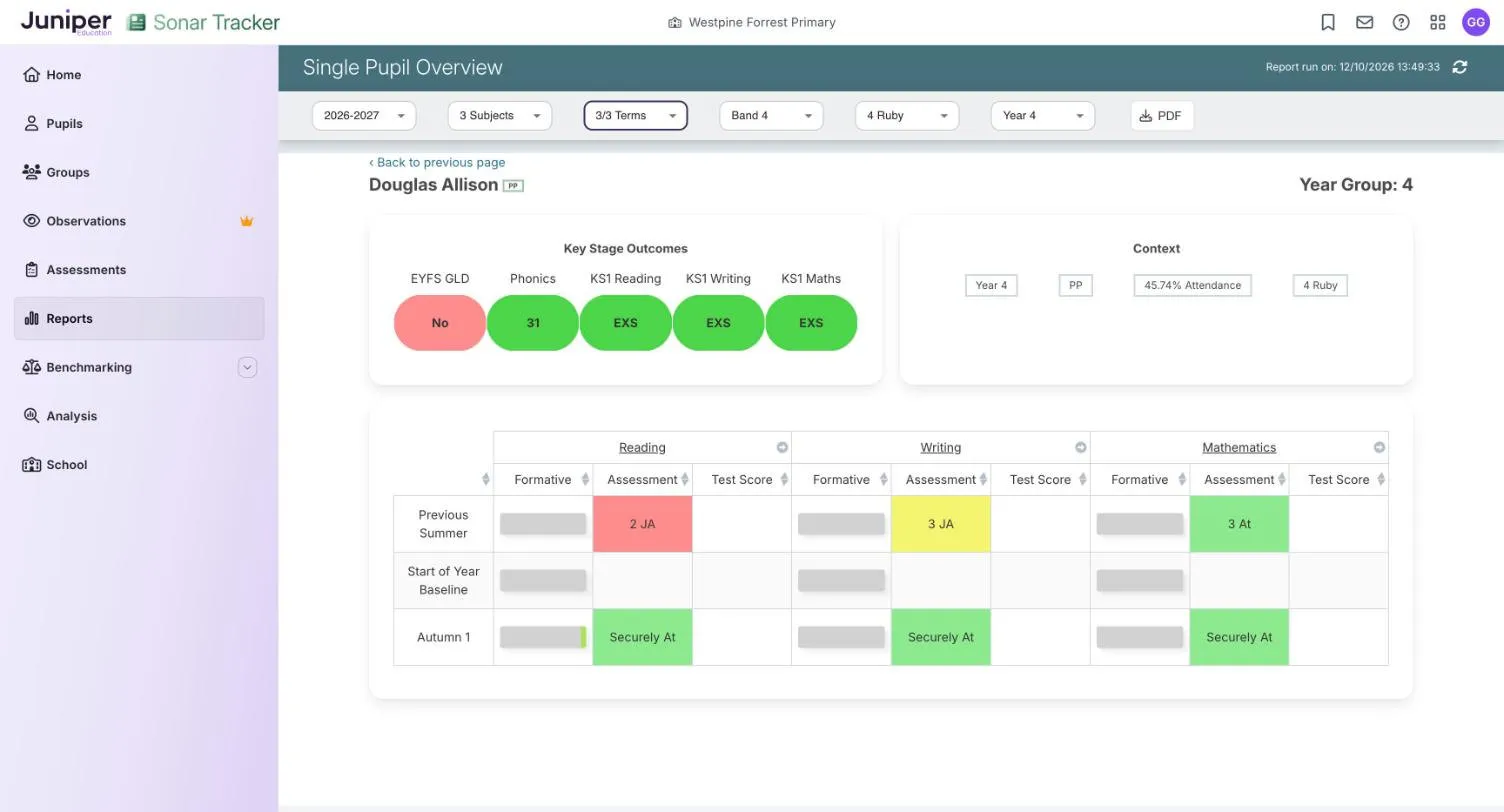
Section titled “Read the report”Under the pupil’s name, Key Stage Outcomes gives statutory results, including EYFS GLD, Phonics and KS1 teacher assessment. Context gives the pupil’s year group, flags, attendance and class.
The table below has a row for each assessment point, such as Previous Summer or Autumn 1, and three columns for each subject. Formative is a grey bar that fills with green as the pupil achieves objectives. Assessment is the summative judgement, and Test Score shows any test score. Earlier points show short codes (2 JA), while the current point spells the judgement out (Securely At).
| Colour | Meaning |
|---|---|
| EXS green | Key Stage Outcomes: at or above the expected standard |
| No red | Key Stage Outcomes: below the expected standard, such as No for GLD |
| 2 JA red | Assessment: a judgement from a band below the pupil’s year group |
| B pink | Assessment: Below |
| 3 JA yellow | Assessment: Just At |
| Securely At light green | Assessment: Securely At |
| A green | Assessment: Above |
In the demo school, Douglas Allison in 4 Ruby did not reach GLD but was EXS in all three KS1 subjects. His reading judgement last summer was 2 JA in red, a Band 2 judgement while he was in year 3. He has none at the start of year baseline, and at autumn 1 he is Securely At.
Points to watch
Section titled “Points to watch”An empty Assessment cell means no judgement was entered at that point: Sonar does not carry judgements forward.
Do not rely on the colour of the Phonics mark. Douglas’s 31 is green here but pink in Triangulation of Data Analysis. Check any mark against the threshold the Standards and Testing Agency (STA) set for the year the pupil took the check.
Before a parents’ evening, plan how to explain codes such as 2 JA in plain words. Make sure no other pupil’s information is on screen. For report writing, read the overview with the pupil’s formative records, then see Create parent reports.